Social CRM Platforms The Guide to B2B Outreach

Your reps are already doing social selling. The problem is that many teams are doing it in fragments.
A prospect replies on LinkedIn. Someone else forwards an email thread. An SDR drops a note in Slack instead of the CRM. The AE logs the call outcome, but the context behind that call stays buried in DMs and browser tabs. By the time the opportunity moves, nobody has a clean record of how the relationship developed.
Many B2B teams get stuck at this point. They don’t have a prospecting problem. They have a visibility problem.
Social CRM platforms matter because buyer conversations no longer begin and end inside email. They start in comments, profile views, post engagement, direct messages, and warm introductions through social networks. If those signals never make it into your system of record, your pipeline data is incomplete from day one.
Why Your Sales Team Needs a Social CRM
A familiar scene plays out on a lot of sales floors.
An SDR starts the morning inside LinkedIn Sales Navigator. They spot a prospect engaging with content from a competitor. They send a connection request, get accepted, and open a short conversation. Later that day, the same prospect clicks an email, replies with interest, and gets booked for a call. The AE takes over, but the AE never sees the original social context that warmed the lead up.
That gap costs teams deals.
Fragmented context is the issue
Traditional CRM hygiene covers the obvious things. Contact fields, account ownership, deal stage, next step. What it misses is the relationship trail that made the opportunity possible.
Without a social CRM layer, teams run into the same failures:
- Duplicate outreach: One rep sends a LinkedIn follow-up while another sends a cold email to the same person.
- Missing buying signals: A prospect comments on a relevant post, but nobody captures that intent signal.
- Weak handoffs: SDRs know the social backstory. AEs inherit a stripped-down contact record.
- Bad forecasting inputs: Pipeline reviews focus on stage movement, not on the quality of engagement behind it.
A good social CRM closes that gap by pulling social activity into the contact and account record where sales teams already work.
Practical rule: If a rep has to open three tools to understand one buyer conversation, your process is too loose.
That’s one reason the category keeps expanding. The global CRM market, which includes social CRM platforms, is projected to surpass $112 billion by 2025 and reach $262 billion by 2032, and effective implementations have been shown to yield over 245% returns plus a 42% improvement in sales forecasting accuracy, according to Kixie’s CRM market analysis.
A social CRM changes how the team works
The best setups don’t “add social.” They centralize the timeline.
A rep should be able to open one contact and see the relevant email replies, LinkedIn touches, notes, call outcomes, and account context in sequence. That creates better timing, better personalization, and fewer sloppy touches.
If your team is still deciding whether a CRM upgrade is worth it, this breakdown of the advantages of CRM is a useful starting point because it frames the operational upside clearly, not just the software feature list.
The main point is simple. Sales teams need one place where social intent and pipeline execution meet. Without that, social selling stays informal, inconsistent, and hard to scale.
Defining Social CRM Beyond the Buzzwords
A lot of vendors blur this category on purpose.
They call a publishing tool a social CRM because it lets you schedule posts. They call a shared inbox a social CRM because it captures messages. They call a browser extension a social CRM because it can save a profile. None of that is enough on its own.
A traditional CRM is a structured record system. It stores known information well. A social CRM is a living relationship layer that keeps updating as buyers interact across public and private channels.
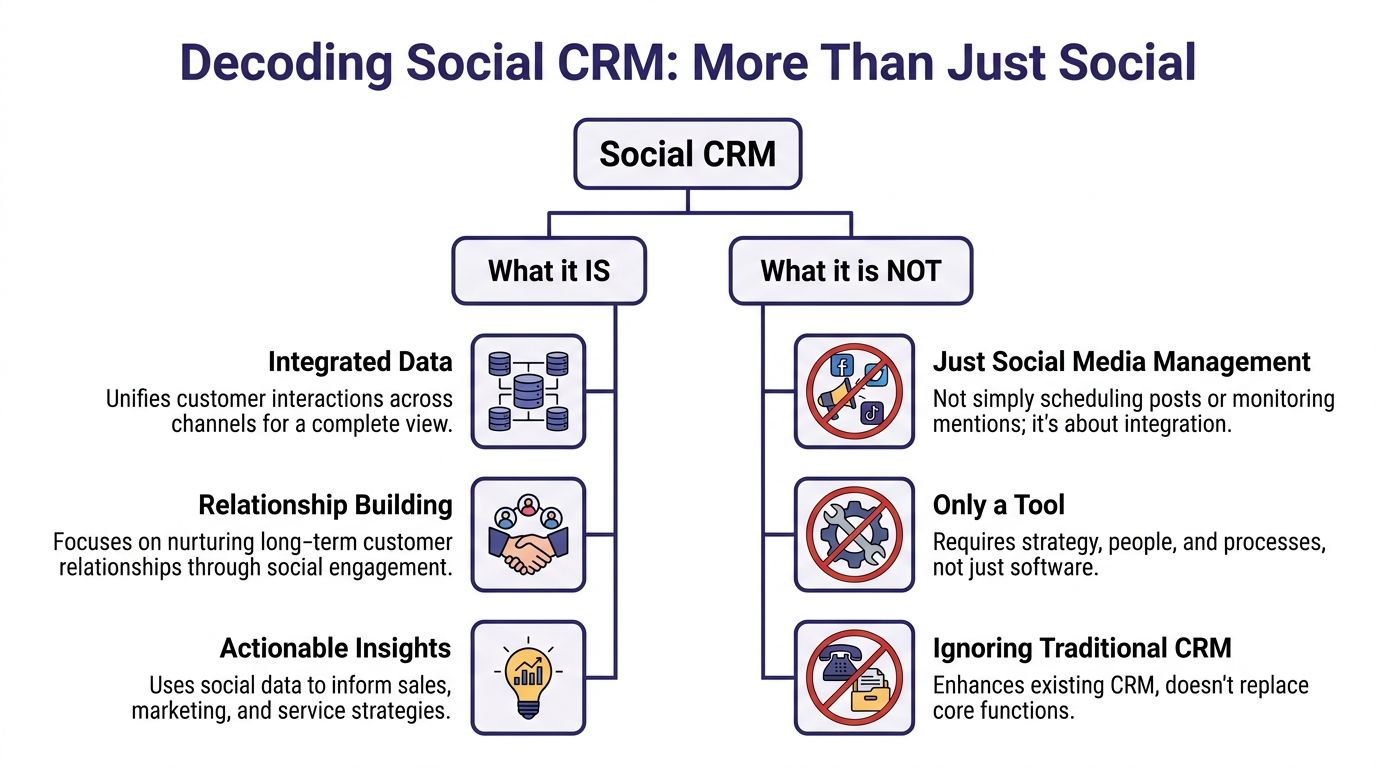
Think static Rolodex versus live dossier
That old comparison still works.
A standard CRM record looks like this:
- name
- title
- company
- phone
- deal stage
- activity notes
A social CRM record should look more like this:
- who the prospect is
- what they’ve engaged with
- where the relationship started
- which social touchpoints happened before the meeting
- how those interactions connect to account activity
That difference matters because B2B outreach rarely starts cold anymore. It starts warm, semi-warm, or signal-based. Someone liked a post. Someone viewed a profile. Someone replied to a comment thread. Someone accepted a connection request after seeing your brand repeatedly. Those are not vanity details. They are context.
What social CRM is
A practical definition is better than a textbook one.
Social CRM platforms do three things well:
- They unify interaction data. Social activity becomes part of the same customer record as calls, emails, and meetings.
- They help teams act on intent. A rep can see recent engagement and decide when to message, call, or hold back.
- They support collaboration. Marketing, SDRs, AEs, and customer success work from the same interaction history.
What social CRM is not
It’s not another top-of-funnel content tool.
If a platform schedules posts, monitors mentions, or publishes to multiple channels, that’s a social media management product. Useful, yes. But it doesn’t qualify as a social CRM unless it ties engagement back to contact and account records in a usable way.
A social CRM should help a rep answer one question fast: what happened with this buyer before I send the next message?
It’s also not a replacement for core CRM structure. Pipeline stages, ownership, reporting, and account management still matter. Social CRM extends that foundation. It doesn’t replace it.
Why this distinction matters for B2B teams
B2B teams buy the wrong tool because the demo looks polished.
A nice inbox view is not enough. A mention tracker is not enough. A LinkedIn sidebar that saves a contact is not enough. If the tool doesn’t preserve relationship context inside the customer record, your reps still have to reconstruct the story manually.
That’s when social selling becomes dependent on memory. Memory doesn’t scale.
Traditional CRM Versus Social CRM A Clear Comparison
The easiest way to understand the gap is to compare how each system treats the same prospect.
A traditional CRM is built to manage known pipeline activity. A social CRM is built to capture and use interaction context around that activity. Neither is useless. Many teams need both functions working together.
Side by side comparison
| Attribute | Traditional CRM | Social CRM |
|---|---|---|
| Data source | Mostly manual entry, form fills, calls, emails, imported records | Social interactions plus CRM activity, synced into contact and account history |
| Customer profile | Static record with fields and notes | Evolving digital identity with engagement context |
| Communication flow | Mostly rep-initiated and process-driven | More conversational, with social replies and public engagement informing timing |
| Visibility | Strong on pipeline stages and ownership | Strong on relationship signals and interaction history |
| Main job | Organize deals, tasks, records, and forecasts | Connect social behavior to selling activity |
| Typical weakness | Social context gets lost outside the CRM | Can become noisy if not tied to clear sales workflows |
| Best use case | Core revenue operations and pipeline control | Social selling, signal-based outreach, and account intelligence |
Where traditional CRM still wins
Traditional CRM platforms remain the operating system for many revenue teams.
They handle:
- Pipeline governance: Stage definitions, required fields, close dates, and ownership rules.
- Forecasting discipline: Managers can inspect deal movement and rep activity.
- Cross-team process: Sales, marketing, and service can all work from shared account records.
If you remove that structure, you don’t get a smarter sales motion. You get chaos with prettier data.
Where social CRM adds the missing layer
A social CRM becomes valuable when your team relies on relationship signals before the lead ever becomes a formal opportunity.
For B2B outreach, that means:
- prospect engagement on LinkedIn
- inbound comments on relevant posts
- direct messages that happen before email
- account-level activity that points to timing or intent
- warmer intros built from network visibility
A normal CRM rarely captures that without heavy manual work. Reps end up logging only the parts they remember or the parts they think leadership cares about.
That creates a distorted pipeline narrative.
The practical trade-off
Social CRM platforms can create clutter if teams treat every social event as equally important.
That’s a common mistake. Not every like, view, or reaction belongs in the sales workflow. What matters is actionable engagement. Replies, direct messages, comment threads with intent, profile-level connection points, and social touches that move toward a meeting or opportunity.
Don’t dump raw social noise into your CRM. Filter for signals that change what a rep should do next.
The strongest stack looks like this:
- Your primary CRM remains the system of record.
- Your social CRM captures and syncs social interactions.
- Reps work from a contact timeline that shows both structured deal data and relevant engagement context.
That setup keeps process discipline without stripping away the relationship detail that modern outbound depends on.
Essential Social CRM Features for B2B Impact
Many feature lists are padded with things that look good in a demo and matter very little in a live outbound motion.
For B2B teams, the useful features are the ones that help reps identify intent, preserve context, and connect social activity to pipeline. Everything else is secondary.
Identity resolution is the feature that separates serious platforms from basic tools
Many buyers overlook this part.
If your platform can’t correctly match a social profile to an existing CRM contact, the rest of the workflow breaks. You get duplicates, split histories, bad attribution, and confused ownership.
The technical core of an effective social CRM is identity resolution and cross-channel attribution. Enterprise platforms use those capabilities to match social profiles to CRM contacts, deduplicate records, and map social interactions directly to revenue outcomes, creating an unbroken data lineage from first social touch to closed deal, as explained in Apollo’s breakdown of social CRM architecture.
That sounds technical, but the operational effect is simple. One buyer should equal one record.
The features that move B2B outreach forward
Unified activity timeline
Your reps need one chronological view of the relationship.
That should include email replies, call notes, social touches, meetings, and internal notes. If LinkedIn messages live in one interface and core deal activity lives somewhere else, your team is still stitching conversations together by hand.
Social listening for buyer signals
This only matters if it is configured around intent.
Useful listening tracks things like:
- Competitor dissatisfaction: Prospects discussing frustration with another tool or provider
- Hiring and expansion clues: New roles, team growth, or territory expansion
- Relevant problem language: Posts asking for recommendations, workflows, or vendor alternatives
Brand mention monitoring alone is a marketing use case. B2B sales needs signal tracking tied to accounts and personas.
Contact enrichment
A bare contact record slows everything down.
When your platform can enrich records with firmographic context, social links, role changes, and account details, reps personalize faster and make fewer bad assumptions. If you want a deeper look at how this works in practice, this guide on data enrichment CRM is worth reading because it focuses on workflow impact, not just database theory.
Attribution that goes beyond clicks
If your team can’t tie social interactions to opportunities, social selling gets dismissed as “good activity” instead of a real pipeline channel.
The right platform should log social touches as part of the contact history, not leave them isolated inside a social dashboard. That’s how you show whether a LinkedIn conversation led to a meeting, whether a comment thread preceded a reply, and whether social engagement increased deal momentum.
Workflow compatibility with outbound systems
A social CRM has to fit the rest of the outbound stack.
If your team uses LinkedIn automation, browser profiles, or multi-step prospecting workflows, the CRM should support that operating model instead of forcing reps back into manual logging. In this context, practical process design matters more than glossy automation claims. For teams building that workflow carefully, this piece on LinkedIn automation and lead generation is a useful reference: /post/linkedin-automation-lead-generation-2026
Features that sound good but often disappoint
Not every “AI” feature deserves attention.
A lot of social CRM products now push:
- sentiment scoring with weak sales relevance
- broad social dashboards with no account-level utility
- surface-level inbox aggregation that doesn’t sync well
- publishing tools disguised as sales enablement
Those aren’t worthless. They’re not where B2B value is created.
The best feature is the one your reps use before every touch. That’s the timeline, enrichment layer, and attribution trail.
If a tool can’t help a rep decide who to contact, when to contact them, and what context to use, it’s not helping sales enough.
How to Evaluate Social CRM Platforms for Sales
Many teams buy social CRM platforms the same way they buy marketing software. They watch a polished demo, ask about integrations, and compare pricing tiers.
That’s not enough for outbound sales.
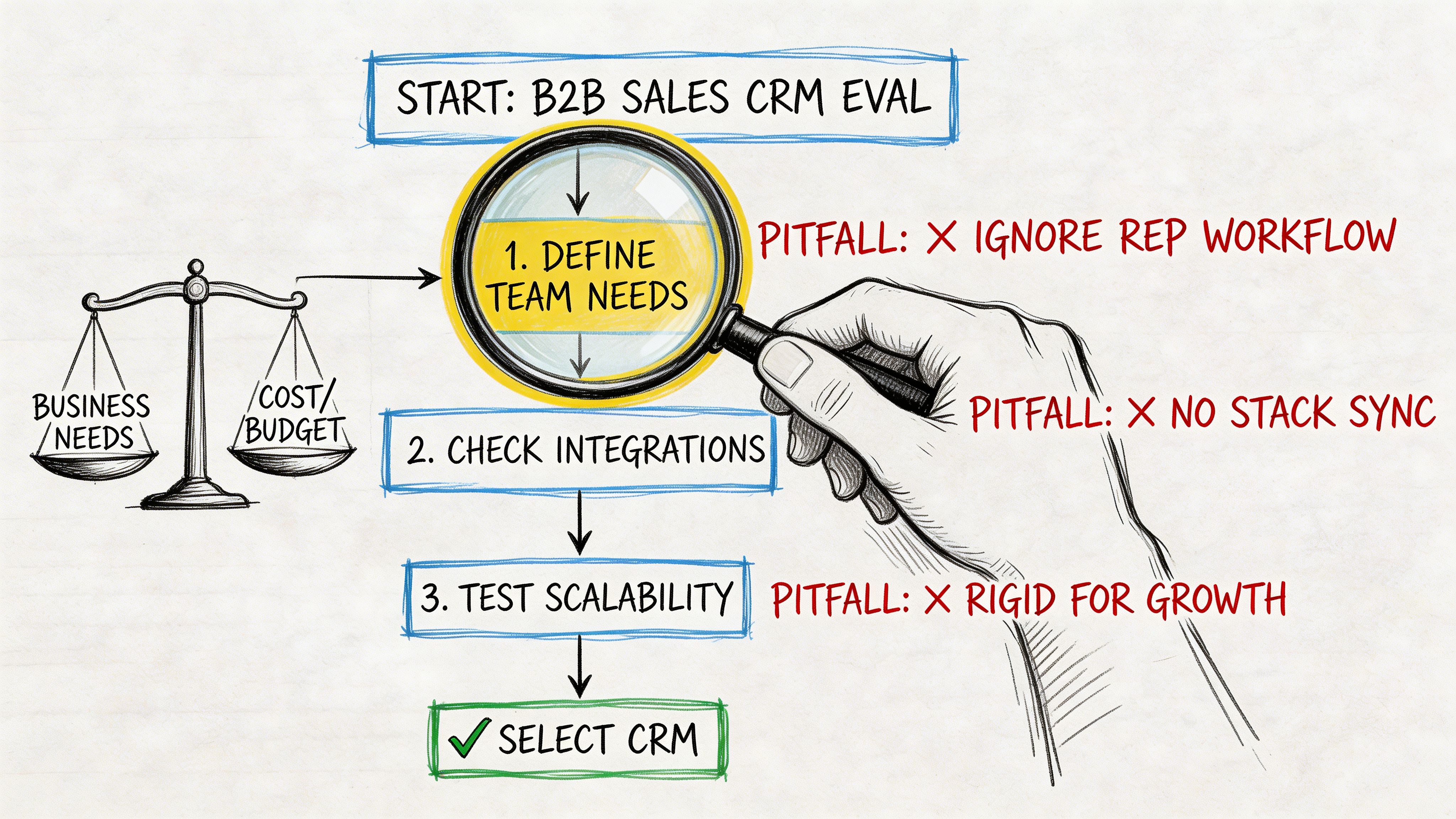
If your team is prospecting on LinkedIn, managing multiple rep workflows, and trying to keep attribution clean, the evaluation has to get tougher. A social CRM can look solid in a sandbox and still fail once reps start using it daily.
Start with LinkedIn reality, not vendor messaging
Vendor messaging creates a blind spot in many buying processes.
Most social CRMs have limited support for LinkedIn, which is the source of a significant portion of B2B leads, and a 2025 analysis found a minority of users reported effective LinkedIn lead conversion through their social CRM because of deliverability issues and weak support for safe multi-account outreach, according to Practical Ecommerce’s review of social CRM tools.
If LinkedIn matters to your pipeline, don’t accept vague claims like “native integration” or “social sync.” Ask what that means.
Questions that expose weak platforms
How deep is the LinkedIn integration
Can the platform attach a profile URL, or can it preserve message context, rep ownership, and activity history in a way your team can use?
A lot of tools stop at profile-level convenience. That’s not enough for outbound.
How does it handle identity matching
If two reps touch the same prospect through different channels, can the platform deduplicate accurately? Or will you end up with multiple contact records and split timelines?
What happens in a multi-account setup
Many social CRM platforms break down here. They’re designed for one brand account or one user action trail, not for SDR teams running parallel outreach motions.
If you’re evaluating tools for that environment, it helps to review a prospecting-focused lens like this one: /post/best-crm-for-prospecting
Who owns the data
Can you export contact records, social activity logs, and message history cleanly? Or are you locking yourself into a black box?
Data portability matters more than many teams realize. If the tool becomes painful later, you’ll want a clean exit.
A quick evaluation framework
| What to test | What good looks like | Warning sign |
|---|---|---|
| Contact matching | One buyer, one timeline | Duplicate contacts and manual cleanup |
| Message sync | Useful social context on record | Social data trapped in a side panel |
| Team scale | Clean ownership across reps | Cross-talk and account confusion |
| Workflow fit | Supports your outbound stack | Forces manual logging or awkward workarounds |
If a vendor can’t answer operational questions about LinkedIn, they probably built for brand marketing, not B2B outbound.
What I’d ignore in the demo
I’d spend less time on visual reporting and more time on edge cases.
Ask the vendor to show:
- a duplicate resolution scenario
- a handoff from SDR to AE with social context intact
- a contact touched on both email and LinkedIn
- what happens when multiple reps work adjacent accounts
- how the system logs social activity over time
The right social CRM platform should make your selling motion cleaner under pressure, not just prettier in a walkthrough.
Implementing Social CRM for Scaled LinkedIn Outreach
Theory falls apart at this stage.
A team buys a social CRM, connects a few accounts, syncs some contacts, and assumes scale will take care of itself. Then restrictions start. Message delivery gets inconsistent. Rep accounts trigger warnings. Activity logs turn messy. Nobody trusts the data.
That failure comes from one mistake. The team treated LinkedIn outreach as a software problem when it’s a systems problem.
Start with account architecture, not automation volume
A scalable setup begins with separation of roles and assets.
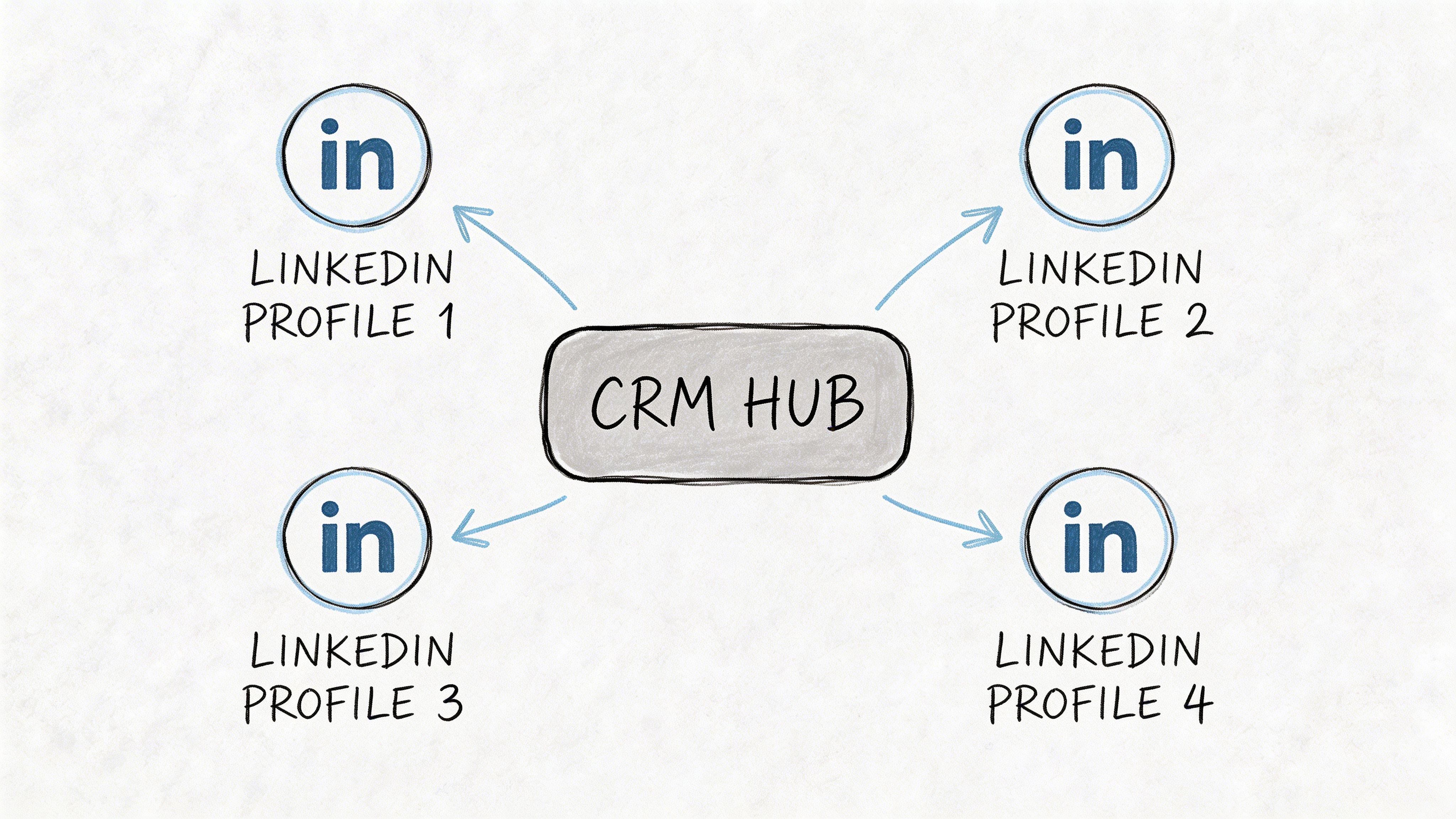
Your primary CRM should remain the source of truth for contacts, accounts, opportunities, and reporting. Your social CRM should capture the social interaction layer. Your automation tool should execute controlled workflows. Those are different jobs.
When teams combine them sloppily, they create avoidable risk.
A workable LinkedIn outreach system includes:
- A primary CRM: HubSpot, Salesforce, or another core system of record
- A social CRM layer: The place where social activity gets attached to records
- An automation tool: Expandi, Dripify, Waalaxy, PhantomBuster, LinkedHelper, or similar
- A browser isolation setup: Separate browser profiles for separate LinkedIn identities
- Network consistency: Stable session behavior and clean operating patterns for each account
The key is that the CRM should track relationship context. It should not be the thing brute-forcing volume.
Why account safety has to lead the strategy
Platform risk mitigation is the biggest missing piece in many social CRM advice. Many growth marketers report ban risks due to poor handling of automation signals. This is important because a significant portion of demand generation relies on LinkedIn, with platform limits tightening, according to Nalashaa Digital’s analysis of social CRM gaps.
That means feature depth alone isn’t enough. You need durability.
Strong social CRM operations are built around account health first, workflow second, volume third.
Teams get this backward. They push volume, trigger risk patterns, and then blame the tool. The problem is a weak account foundation plus unnatural behavior.
A practical rollout for safe scale
Phase one builds clean records
Before launching volume, make sure the system can:
- map each LinkedIn identity to the right rep
- log social touches into the correct contact
- prevent duplicate records when the same buyer appears through email and social
- preserve account ownership across SDR and AE handoffs
If this layer is broken, don’t scale yet.
Phase two warms process before volume
Start with low-friction activity. Profile viewing, connection building, light engagement, and controlled message pacing. The goal is to make account behavior look normal and stable over time.
This is also where teams should decide which actions belong inside automation and which require human review. Connection acceptance is not the same as sales readiness. A comment reply is not always a direct-message opportunity. Social CRM data helps reps decide, but it shouldn’t remove judgment.
Phase three segments account roles
Not every LinkedIn account should do the same work.
Some accounts are better for:
- top-of-funnel connection growth
- persona-specific prospecting
- account-based follow-up
- re-engagement of stalled conversations
This reduces repetitive patterns and keeps outreach behavior more believable.
What works better than “one main profile”
A lot of teams try to run everything through one founder account or one senior rep account. That creates concentration risk.
A more durable model uses multiple legitimate working profiles with clearly assigned territories, personas, or campaign types. Each profile should have its own operating environment and its own social history. That makes the CRM data cleaner and the outreach pattern more natural.
There’s also a scheduling side to this. If your team is coordinating message timing across campaigns, this guide on whether you can schedule LinkedIn messages is a practical companion to the CRM side of the equation: /post/can-you-schedule-linkedin-messages
Where automation helps and where it hurts
Automation is useful for consistency. It is dangerous when teams use it to eliminate all judgment.
Good uses:
- sequencing low-risk follow-ups
- task creation after a social event
- reminders tied to acceptance or reply states
- activity logging into the CRM timeline
Bad uses:
- aggressive connection surges
- rigid message blasts across mixed personas
- same-day overactivity across multiple accounts
- treating every accepted invite as sales-ready
The social CRM should tell reps what happened. It should help them decide what to do next. It should not encourage robotic selling patterns.
Here’s a useful video overview to pair with implementation planning:
The part many teams ignore
The strongest LinkedIn outreach systems aren’t efficient. They are durable.
That means the team has thought through:
- ownership of the account assets
- recovery if a profile is restricted
- separation between personal and campaign use
- realistic activity pacing
- how social conversations get handed into live pipeline management
If those decisions are vague, the CRM won’t save you. It will just document the mess more neatly.
Measuring What Matters Social CRM ROI Metrics
Many teams still report social performance with shallow metrics.
Likes, reach, profile views, follower growth, and post impressions might matter to marketing. They don’t tell sales leadership whether the channel is producing pipeline.
A better approach is to measure social CRM output the same way you’d measure any serious outbound motion.
The metrics worth tracking
Social-sourced pipeline
Track opportunities where the first meaningful engagement came through a social touchpoint or where social interaction materially advanced the deal.
This requires clean logging in both the social CRM and the main CRM. If the systems aren’t synced, this metric gets political fast.
Engagement-to-meeting rate
This is one of the most useful operating metrics for SDR teams.
Define what counts as a meaningful social engagement first. That means a real reply, an active DM exchange, or a buying-signal interaction. Then measure how often that turns into a scheduled meeting.
Pipeline velocity on socially influenced deals
Some deals move faster because the relationship starts warmer.
Look at opportunities with documented social touchpoints and compare their movement through the pipeline against your baseline sales motion. The goal isn’t to prove social wins every time. The goal is to understand whether social context shortens the path to trust.
Leadership doesn’t need more activity reports. They need evidence that social touches create meetings, pipeline, or faster deal movement.
Keep the reporting clean
A simple dashboard is enough if the data model is solid.
Include:
- Source classification: How the conversation started
- Touchpoint history: Which social and non-social actions happened before the meeting
- Opportunity linkage: Whether the contact entered or influenced open pipeline
- Channel cost view: What resources went into the motion compared with other outbound channels
What to avoid
Don’t mix brand metrics with revenue metrics unless you separate the purpose of each.
A post can perform well and still produce weak sales outcomes. A quiet DM workflow can look unimpressive publicly and still drive strong pipeline. The CRM should help you tell that difference clearly.
If your reporting doesn’t connect social activity to meetings, opportunities, and deal progression, you’re still measuring noise.
If your team is scaling LinkedIn outreach and you need durable account infrastructure, BIDVA provides real, ID-verified, warmed-up LinkedIn accounts built for safer multi-account operations. That’s useful for agencies, SDR teams, recruiters, and growth marketers who need full ownership, stronger trust signals, and a setup that fits tools like Expandi, Dripify, Waalaxy, PhantomBuster, and LinkedHelper without relying on fragile rental access.