How Many Invitations Can I Send on LinkedIn?

Most advice on how many invitations can i send on LinkedIn starts with a number. That's the wrong starting point.
If you run outreach seriously, you already know the problem. One account gets stopped early. Another keeps sending. A recruiter with a mature profile has room to work, while a fresh SDR profile hits friction almost immediately. The platform doesn't behave like a simple quota system. It behaves like a reputation system.
That's why the better question isn't “what's LinkedIn's limit?” It’s “how much does LinkedIn trust this specific account right now?” Once you look at invites through that lens, the platform makes a lot more sense, and so do the trade-offs between manual outreach, automation, account warming, and account rotation.
Why There Is No Single Answer to LinkedIn's Invite Limit
The most repeated answer online is some variation of “LinkedIn lets you send X invites per week.” That sounds clean, but it hides that the limit is personalized.
Reports on the web conflict for a reason. Some put free accounts in the 50 to 100 weekly range and Premium or Sales Navigator in the 150 to 250 range, while also admitting that account age, connection count, and SSI influence the actual cap for each user, with examples like accounts under 500 connections sitting around 100 per week and stronger profiles reaching 200 to 250 without any clear public formula, as noted by LinkedHelper's review of LinkedIn weekly invitation limits.
LinkedIn uses a trust model, not a public rulebook
In practice, LinkedIn seems to assign every account a private credibility score. Call it a trust score, a reputation layer, or the “vibe check” people joke about. The label doesn't matter. What matters is the behavior behind it.
Accounts that look real, active, and useful get more room. Accounts that look rushed, noisy, or low-quality get less.
That explains why these situations produce different outcomes:
- A new SDR account with a thin profile and little engagement gets throttled early.
- A recruiter account with an older profile, a complete work history, and steady activity usually has more sending room.
- An agency-operated account can perform well or get flagged fast depending on pending invites, acceptance quality, and sending pace.
Practical rule: Stop looking for one universal number. Start assessing whether your account has earned enough trust to use the limit safely.
Why teams get stuck
Most B2B sales teams and recruiters struggle with this. They build workflows around target volume, but the platform allocates capacity around account credibility.
That mismatch causes three common mistakes:
- They buy software before they build trust. Expandi, Dripify, Waalaxy, Dux-Soup, and LinkedHelper can organize activity, but none of them can rescue a weak account.
- They optimize copy while ignoring account health. Better invite notes help, but they won't offset a backlog of bad pending requests.
- They treat all profiles as interchangeable. They aren't. Two accounts on the same team can have very different ceilings.
If you understand that, the question becomes manageable. You stop chasing hacks and start managing the inputs LinkedIn seems to care about.
The Three Types of LinkedIn Connection Limits
LinkedIn does not police outreach with one master number. It applies three separate caps, and each one reflects the same underlying question: how much sending freedom has your account earned?
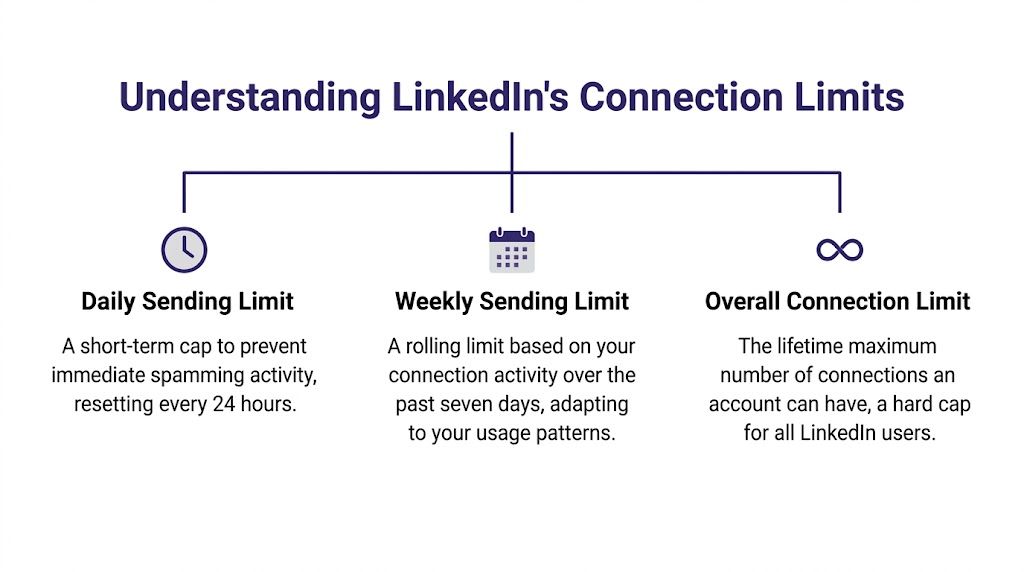
Operators who miss this usually focus on the weekly ceiling because that is the one LinkedIn surfaces first. In practice, the weekly cap is only one part of the control system. Pending invites and total lifetime sends matter too, especially if you're running outbound at scale across recruiting, sales, or agency-managed profiles.
Weekly sending limit
The weekly limit is the visible throttle. For many accounts, reported ranges cluster around roughly 100 to 200 invitations per week, with lower room on newer or weaker profiles and more flexibility on older accounts that behave like real users, according to LigoSocial's breakdown of LinkedIn invitation limits.
That message about hitting your weekly invitation limit is not random. It means LinkedIn has decided your account has used its current allowance.
The operational mistake is treating that allowance as fixed. It is better understood as a trust-dependent budget. A stable recruiter profile, especially one supported by the workflows discussed in LinkedIn Recruiter Lite vs Recruiter, often holds up better than a freshly created outbound profile with sparse activity and weak acceptance rates.
LigoSocial also notes that LinkedIn shut down older workarounds in August 2022, including CSV and email-based connection methods. That matters because brute-force sending became harder. Account quality started mattering more.
Pending invitation limit
The pending limit is where many campaigns gradually fail. You can keep sending until your backlog of unanswered requests gets large enough that LinkedIn starts reading your behavior as poor targeting or low relevance.
Different sources report different thresholds, and that variation is the point. There is no universal pending number that applies to every account. The safer read is strategic: a large pile of stale invites lowers account trust and reduces your room to keep sending.
Two things happen when pending requests stack up:
- Your available sending capacity shrinks
- Your account starts broadcasting weak acceptance quality
This is why experienced teams withdraw old, ignored invites instead of letting them sit for months. Pending volume is not just clutter. It is part of the account's reputation.
Lifetime invitation limit
The longest-range cap is the lifetime invitation limit. LinkedIn appears to cap total invites over the life of an account at 30,000, as documented by Skylead's guide to LinkedIn invitation limits.
That number sounds remote until you manage outreach for a recruiting team, sales floor, or agency. Then it becomes an account planning issue. High-output sending burns through lifespan, and burned-out accounts are hard to replace if you have not been warming and verifying new ones in parallel.
| Limit type | What it controls | What happens when you push it |
|---|---|---|
| Weekly limit | How many invites you can send in a weekly cycle | Sending stops until the cycle resets |
| Pending limit | How many unanswered invites your account can carry | Capacity tightens and account quality signals weaken |
| Lifetime limit | Total invites an account can send over its full life | Long-term sending capacity gets used up |
The practical takeaway is simple. Teams that scale safely manage all three limits together, because LinkedIn treats them as connected signals inside the same trust system.
How LinkedIn's Algorithm Decides Your Personal Limit
If two accounts don't get the same invite allowance, LinkedIn must be scoring them differently. That's the useful way to think about it.
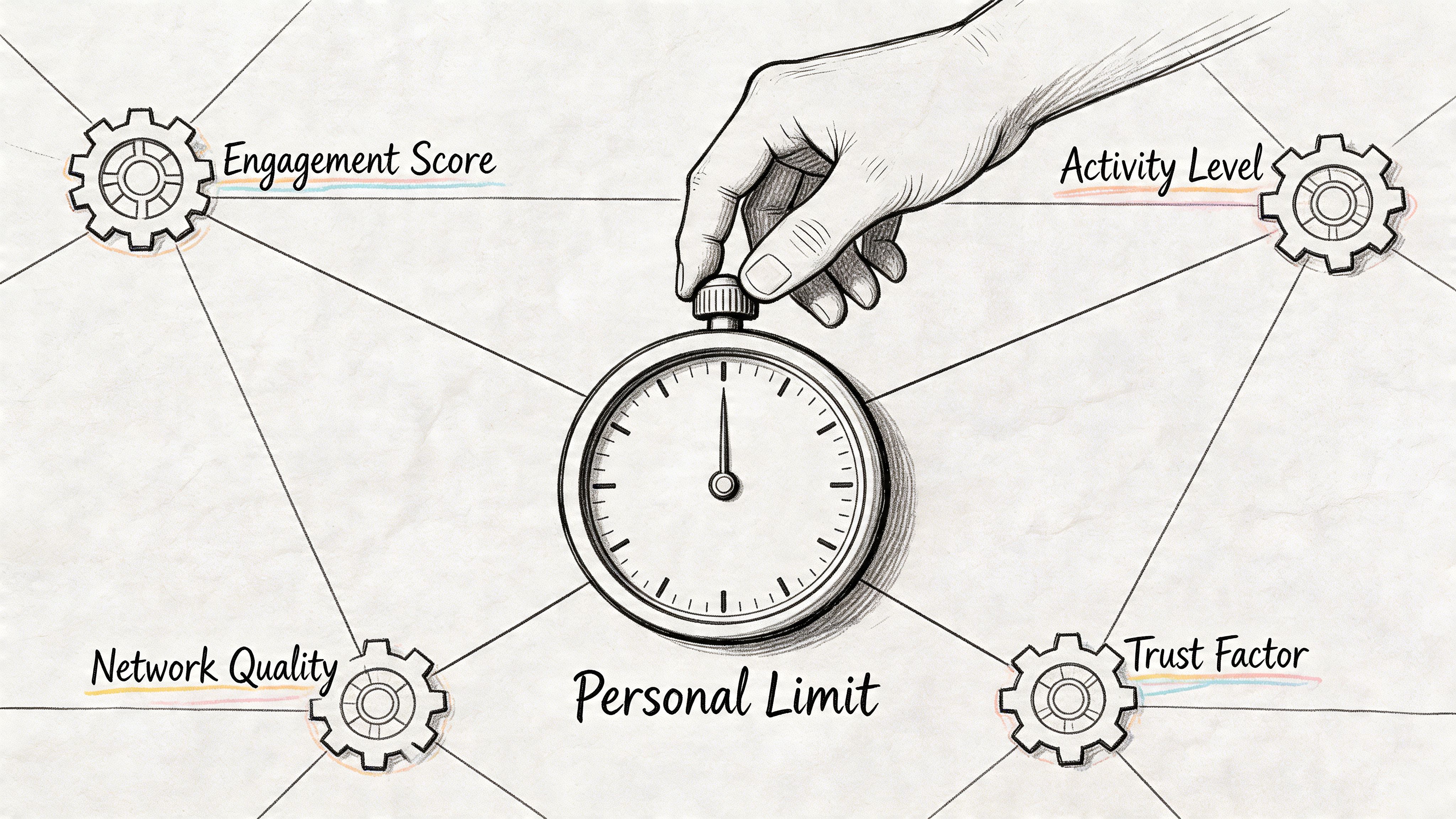
The platform appears to adjust invitation capacity through a private trust model based on signals like account age, acceptance rates, pending invites, engagement, SSI, profile views, daily activity patterns, and “I don't know this person” reports. Topo describes this as a dynamic algorithmic “vibe check,” with standard users often landing around 100 weekly, while also advising operators to stay under 3% of their 1st-degree network in a week, such as 150 for 5,000 connections or 300 for 10,000 connections, in its guide to LinkedIn invitation limits.
The signals that seem to matter most
Some inputs are hard to change quickly. Others are very controllable.
Here are the major levers operators should watch:
- Account age: New profiles usually operate inside a sandbox period. They haven't earned much credibility yet.
- Acceptance quality: If people accept your requests consistently, LinkedIn gets a strong signal that your outreach is relevant.
- Pending invite load: Too many unanswered requests makes the account look pushy or poorly targeted.
- Engagement footprint: Profiles that post, comment, respond, and get profile views tend to look more authentic.
- Complaint signals: “I don't know this person” reports are one of the clearest signs your targeting is off.
SSI matters, but not in isolation
SSI gets overhyped, but it shouldn't be ignored. It doesn't work like a magic key. It's better seen as a summary of whether the account acts like a real professional user rather than a pure sending machine.
That matters for recruiters especially. If your workflow depends on outreach volume, search depth, and message delivery, account trust and product choice intersect. Teams comparing sourcing setups usually get more value by understanding platform constraints alongside tooling differences, which is why this breakdown of LinkedIn Recruiter Lite vs Recruiter is worth reviewing before you scale headcount outreach.
A simple rule is enough here: the stronger the account's professional footprint, the less every invite looks like unsolicited noise.
Before pushing volume, watch how experienced operators frame the limit issue in practice:
What hurts trust fastest
The worst mistakes are rarely dramatic. They're repetitive.
One account sends too many low-context invites. Another gets ignored for weeks. A third runs automation on a profile that never had real engagement to begin with. None of those actions looks catastrophic by itself. Together, they make the account look synthetic.
The algorithm doesn't need to know your intent. It only needs enough signals to decide whether your behavior resembles spam.
That's why safe scaling starts long before your first campaign launch. Personal limits aren't random. They're earned, reduced, and re-earned through behavior.
Recognizing the Warning Signs of a LinkedIn Restriction
Not every warning on LinkedIn means you're in trouble. Some messages are routine. Others mean you need to stop campaign activity immediately and clean up the account.
The first sign is usually harmless. If you hit your normal ceiling, LinkedIn shows a message telling you that you've reached the weekly invitation limit. That means capacity is exhausted for now. It doesn't automatically mean the account is under restriction.
Low-risk signal versus high-risk signal
You need to separate normal friction from platform distrust.
Lower-risk warning signs usually look like this:
- Weekly cap notice: You used your current allowance.
- Minor send friction: Requests stop going through cleanly, but the account still functions normally.
- Soft slowdown: Campaign performance drops and approvals become less predictable.
Higher-risk warning signs feel different:
- Temporary sending restriction: LinkedIn blocks new invites beyond the normal cap behavior.
- Identity or security checks: The platform wants extra proof that a real person controls the profile.
- Broader account limitation: Search, messaging, or outreach workflows stop behaving normally.
What operators should do next
The wrong reaction is to push harder from the same account.
The right reaction is usually some mix of pausing sends, reducing campaign aggressiveness, reviewing audience quality, and checking pending invite hygiene. If the account is already restricted, this guide on what to do when LinkedIn restricted your account gives a useful triage path.
Field note: A normal limit message says “wait.” A real restriction says “something about this account's behavior no longer looks safe.”
Patterns that usually show up first
Before a restriction becomes obvious, you often see softer operational clues:
- Acceptance weakens even when your targeting hasn't changed much.
- Invites linger and pending volume grows.
- Automation feels unstable because the account no longer tolerates the same rhythm.
That sequence matters. Restrictions rarely arrive out of nowhere. Most accounts telegraph the problem first.
How to Maximize Outreach Without Getting Banned
You don't need tricks. You need discipline.
The safest way to increase LinkedIn output is to improve the quality signals behind your outreach. That means better targeting, cleaner account management, and a sending rhythm that looks like a person doing real business, not a script trying to empty a prospect list.
Start with acceptance, not volume
Most underperforming outreach setups focus on how many requests they can push. Strong setups focus on who is most likely to accept.
Better audiences usually include people who already recognize your name, your company, your niche, or your relevance. Shared context matters. Mutual groups, event overlap, niche relevance, and topical familiarity all help because they reduce the “who is this?” reaction.
A short note can help when it adds real context. It hurts when it's generic. “Saw you're hiring SDRs in SaaS” works better than a templated paragraph trying too hard to sound personal.
Keep your pending queue clean
Pending invites are not harmless leftovers. They shape how LinkedIn interprets your account quality.
Good operators review sent invitations regularly and remove stale requests instead of treating the sent folder like storage. If you're automating outreach, this matters even more. A documented safe LinkedIn automation workflow that reduces ban risk should include pacing, withdrawals, browser isolation, and clear account-specific limits.
Use this operating checklist:
- Send to relevant people first: Shared context raises acceptance and protects account reputation.
- Withdraw old requests: A cleaner queue gives you a more honest picture of what your targeting is producing.
- Pace activity: Don't batch all invite activity into one short window if you can avoid it.
- Mix actions: Profiles that only send invites look narrow. Profiles that also browse, engage, and reply look normal.
- Watch the network ratio: The earlier Topo guidance on staying within a small share of your current 1st-degree network is a practical ceiling for many teams.
Working habit: If an account's acceptance quality drops, reduce targeting breadth before you reduce copy quality or add more tooling.
What doesn't work anymore
A lot of old advice is stale.
Uploading contacts to get around limits, leaning on account type alone, or assuming Premium removes invite constraints isn't a serious strategy now. Neither is blasting cold audiences with the same note and hoping a tool smooths it over.
The accounts that last tend to share the same boring habits. They target tighter lists. They keep queues clean. They don't ask one profile to carry all the volume.
Scaling Your Outreach with Warmed and Verified Accounts
Single-account optimization works up to a point. Then the math stops cooperating.
If one account has to carry all your outreach, every problem becomes concentrated. One restriction can stall pipeline. One weak acceptance streak can force a pause. One new profile can spend its early life fighting trust limitations instead of producing meetings or candidates.
Why new accounts are a bad place to start scale
Fresh LinkedIn profiles are the slowest assets in outbound.
Outx reports that new accounts often begin around 5 to 10 invites per day or roughly 50 to 75 per week, then may scale toward 25 to 30 per day or 150 to 200 per week as trust builds through engagement, strong recent acceptance, and low complaint signals, while also noting that aged, verified accounts can start with 150 to 200 per week capacity on day one in the right setup, according to its weekly LinkedIn invitation limit analysis.
That gap matters operationally. A new account needs patience. A mature account gives you room to work.
The trust advantage of warmed profiles
A warmed and verified account solves the exact problem discussed throughout this article. It starts further up the trust curve.
Instead of spending weeks making a blank profile look credible, teams can begin from an account that already has age, history, and a base of connections. That doesn't remove risk. It reduces the amount of trust-building the operator must do from scratch.
This is especially useful for:
- Agencies managing multiple client campaigns
- Sales teams segmenting outreach by ICP, geography, or rep
- Recruiters who don't want sourcing volume tied to one personal profile
- Automation users running tools like PhantomBuster, Waalaxy, Expandi, or LinkedHelper across controlled account pools
| Metric | New Account (0-3 Months) | Established Personal Account (1+ Year) | BIDVA Warmed & Verified Account |
|---|---|---|---|
| Starting invite capacity | Lower initial capacity and tighter throttling | More stable if account is healthy | Higher day-one potential when delivered warmed and verified |
| Trust with LinkedIn systems | Limited history | Built over time through normal use | Pre-built through age, verification, and connections |
| Risk of early restrictions | Higher if pushed too fast | Moderate, depends on behavior | Lower than brand-new profiles when operated carefully |
| Best use case | Personal networking and gradual warm-up | Ongoing individual outreach | Team-based scale and multi-account campaigns |
Multi-account scale beats forcing one profile
The strongest outbound systems usually spread activity across several credible accounts instead of trying to squeeze maximum volume from one.
That lets you segment by market, protect your main identity, and absorb temporary friction without shutting down the whole motion. If you're evaluating account inventory for that model, this overview on buying bulk LinkedIn accounts for outreach operations is a practical starting point.
Scaling safely on LinkedIn isn't about finding a loophole. It's about using more trustworthy assets, with lower per-account pressure.
That's the core trade-off. You can grow slowly on one account and stay cautious, or you can build a controlled account portfolio that makes outreach volume more predictable.
Frequently Asked Questions About LinkedIn Limits
Does withdrawing pending invitations reset the weekly limit
No. Sent invites still count against that cycle.
Withdrawal still helps account health. A large pile of ignored requests signals weak targeting and lowers the margin for future sending, so cleaning out old pending invites is a maintenance task, not a way to recover capacity.
Does Sales Navigator give unlimited connection requests
No. Sales Navigator improves search and filtering. It does not remove invite controls.
Accounts with stronger history, cleaner engagement, and better acceptance rates often hold up better under normal outreach volume. LinkedIn still judges the account first, then the tool attached to it.
What's the first thing to do after a temporary restriction
Stop all invite activity and audit the account.
Check who you targeted, how fast you sent, how many requests are still pending, whether your messages looked repetitive, and whether any automation was running too aggressively. Restrictions usually follow a pattern. Find that pattern before you send again.
Is a personalized note always better
No. Relevance beats personalization for its own sake.
A short note tied to a shared context can help. A generic template, fake compliment, or long pitch often hurts acceptance because it reads like outreach at scale. On many accounts I have managed, a clean invite with no note outperformed a weak note.
Should I use my main personal profile for scaled outreach
Usually no.
If the profile matters to your reputation, hiring, partnerships, or long-term network, protect it. Use it for real relationships and inbound credibility. Run campaign volume through separate accounts that were prepared for outbound, especially if your team needs consistency across multiple reps or markets.
What's the safest mental model for LinkedIn invite limits
Treat the limit as an output of account trust, not a fixed number.
LinkedIn appears to adjust sending freedom based on account history, identity strength, acceptance rate, reply signals, complaint risk, and the quality of your pending queue. That is why two accounts can behave very differently under the same daily volume. One keeps sending. The other gets throttled.
Do ID verification and account age affect invite capacity
Yes, they usually help.
Older accounts with complete profiles, normal usage patterns, and verified identity tend to start from a stronger position than fresh accounts pushed into outreach right away. That does not make them immune to restrictions. It gives them more room to operate if the targeting and pacing are sound.
What's the practical way to scale invites without burning accounts
Use more trusted accounts and keep pressure lower on each one.
That usually means working from warmed, ID-verified profiles with real history, then spreading campaigns across account inventory instead of forcing one profile to carry all volume. BIDVA provides real, ID-verified, warmed-up LinkedIn accounts with full ownership, which gives sales teams, recruiters, and agencies a stronger starting point than building from zero on brand-new profiles.