Why is my linkedin account restricted: Fix Your Restricted LinkedIn Account in 2

It’s a heart-sinking moment for anyone in sales or networking: the dreaded "Your account has been restricted" notification from LinkedIn. Suddenly, your main channel for outreach is completely frozen.
This isn't just a random glitch. A restriction is almost always a sign that your activity has tripped LinkedIn's automated security wires. The platform's algorithm is constantly watching for behavior that looks spammy, fraudulent, or just plain unnatural, and when it sees enough red flags, it hits the pause button on your account.
Why Your LinkedIn Account Was Suddenly Restricted
So, what exactly are these red flags? It helps to think of your LinkedIn account as having a reputation. Every action you take—sending a connection request, logging in from a new device, even the content on your profile—either builds or damages that reputation in the eyes of the platform.
When your account’s reputation dips too low, an automated restriction is triggered. This isn't usually a permanent ban, but rather a temporary lockdown. LinkedIn is essentially putting your account in a time-out to verify you're a real human who's playing by the rules, not a bot or a bad actor trying to compromise the network for everyone else.
Common Triggers That Lower Your Account's Reputation
Most restrictions boil down to a handful of common mistakes. If you’ve been flagged, odds are high that one of these is the culprit.
To help you diagnose the issue, let's break down the most common actions that get accounts flagged. The table below outlines different types of violations, provides a specific example for each, and describes the typical consequence you can expect.
Common Restriction Triggers and Their Severity
| Violation Type | Example Action | Typical Consequence |
|---|---|---|
| Aggressive Outreach | Sending 200+ connection requests in a single day. | Temporary restriction, weekly invitation limit imposed. |
| Poor Engagement | A very low acceptance rate on your connection requests. | Restriction, prompts to verify you know the people you're adding. |
| Security Flags | Logging in from New York, then an hour later from a different country. | Immediate temporary restriction pending ID verification. |
| Automation Misuse | Using a Chrome extension that auto-sends messages for you. | Warning, followed by temporary or permanent restriction. |
| Profile Issues | Using a stock photo or a clearly fake name. | Account restricted until you provide a government-issued ID. |
| Terms of Service Violation | Sharing or selling access to your account with others. | Permanent restriction or account closure. |
Understanding these triggers is your first step toward recovery. As you can see, the severity of the consequence often matches the perceived threat to the platform's integrity, ranging from a simple slap on the wrist to a permanent ban.
The most common offender, by far, is aggressive outreach. Firing off hundreds of connection requests in a short time frame is a classic spam signal. LinkedIn has an unofficial weekly limit—thought to be around 100 invites—and blasting past that is the fastest way to get your account flagged.
Other key reasons include:
- Low Acceptance Rate: If most of your requests are ignored or, worse, marked as "I don't know this person," LinkedIn assumes your outreach is unwanted and spammy. This tanks your account's reputation fast.
- Unusual Login Patterns: Logging in from multiple IP addresses or locations in a short window makes it look like your account was hacked. LinkedIn will lock it down to protect you (and its network).
- Using Banned Automation Tools: LinkedIn is very clear in its User Agreement that it doesn't allow most third-party automation tools for scraping data or sending messages. Using them is a direct violation.
- Profile Inconsistencies: An account with a fake name, a stock photo for a profile picture, or very little information looks suspicious. LinkedIn may restrict it and demand you verify your identity.
One of the most serious violations, often leading to a swift and permanent ban, is the practice of buying LinkedIn accounts. This is a direct violation of LinkedIn's terms and is something the platform is very effective at detecting.
Ultimately, a restriction is LinkedIn's way of forcing a review. It’s a mechanism to ensure the platform remains a trustworthy and professional space, and understanding that is the key to getting your account back and keeping it safe in the future.
Figuring Out What Went Wrong With Your Restriction
So, you've been hit with a restriction. The first thing you're probably asking is, "Why me?" Unfortunately, LinkedIn's notifications are famously vague and almost never give you a straight answer. It’s on you to play detective and figure out what triggered their alarm bells.
Think of it like this: not all restrictions are the same. Sending too many connection requests is a bit like getting a speeding ticket—it’s a common misstep. But using a fake profile picture or a bogus name? That's more like driving without a license. It’s a fundamental identity issue, and LinkedIn will want proof of who you are, fast. The key is to match your recent activity to their rules to pinpoint the root cause.
Common Red Flags to Investigate
To get to the bottom of it, you need to take an honest look at what you were doing on the platform right before the restriction hit. Ask yourself a few direct questions:
- Your Outreach Numbers: Did you go a little wild with connection requests? Sending more than 100 a week is a classic trigger.
- Your Login Habits: Have you been logging in from different cities, on multiple devices at once, or using a VPN?
- Recent Profile Edits: Did you just change your name, swap out your profile picture, or update your headline?
- Automation Tools: Be honest. Were you using any browser extensions or other tools to automate sending messages or connection requests?
Answering these questions gives you the ammunition you need for a solid appeal. For instance, if you were using an automation tool, it’s much smarter to own up to a potential policy misstep than to pretend you have no idea what happened.
This flowchart breaks down the most common reasons people find their accounts restricted.
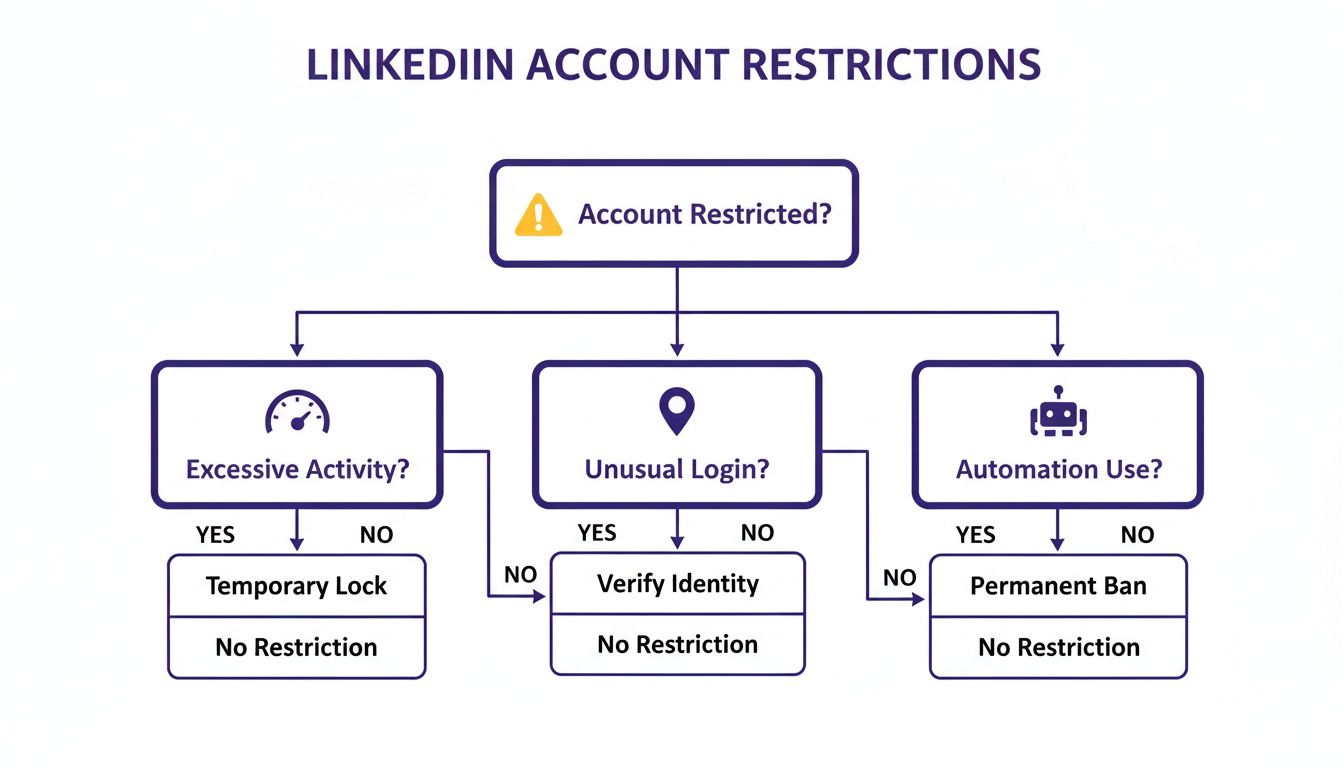
As you can see, most restrictions boil down to your behavior—going too fast, logging in from strange places, or using unauthorized tools.
Looking for Patterns in Your Account History
Sometimes, the cause isn't one single, obvious mistake. It might be a slow burn—a series of small actions that gradually eroded your account's "trust score" with LinkedIn's algorithm. For example, if your connection acceptance rate is consistently low, LinkedIn sees it as a sign that your outreach is spammy or unwanted.
To get the full picture, you might need to dig deeper. We have a whole guide on how to review your LinkedIn account activity history that can show you exactly where to look.
Remember, LinkedIn’s algorithm isn't just looking for a single slip-up. It's hunting for patterns of behavior that look unnatural or inauthentic. A sudden surge in profile views, a string of logins from different countries, or a huge batch of connection requests can all add up to a red flag.
By retracing your steps and comparing them against what we know triggers LinkedIn, you can move from confusion to clarity. This diagnosis is everything. It gives you the specific details you need to write a convincing appeal and get your account back in action.
Your Step-by-Step Account Recovery Plan
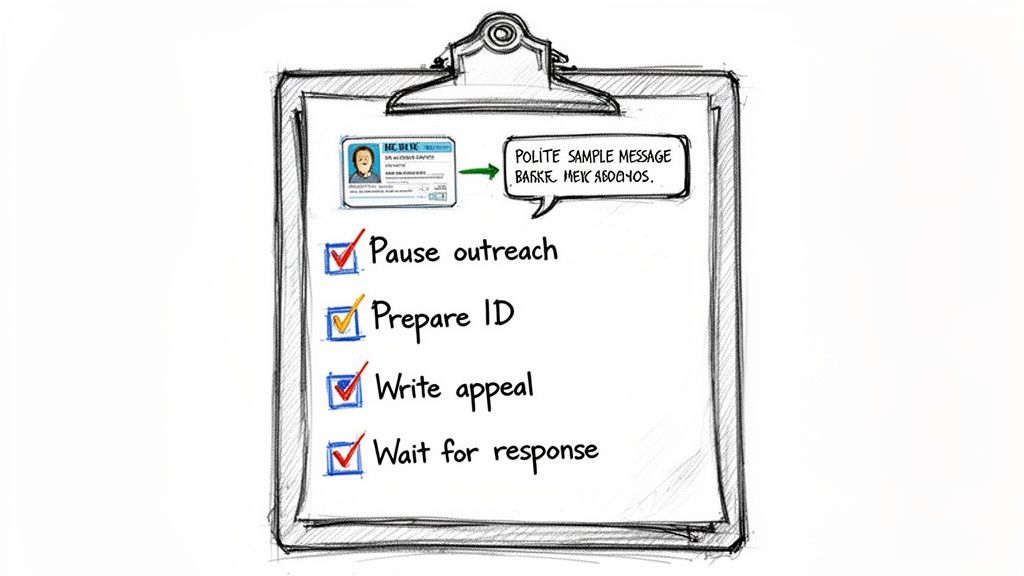
Finding out your LinkedIn account is restricted can feel like your digital life has ground to a halt. It’s a frustrating moment, but what you do next makes all the difference. The very first thing you need to do is immediately pause all activity.
Seriously, stop everything. If you're running any outreach or automation tools, shut them down now. Continuing to push activity through a restricted account is the fastest way to turn a temporary problem into a permanent ban.
With everything on pause, you can start the recovery process. The key here is to stay calm and be professional. An honest and cooperative tone will get you much further with LinkedIn's support team than a demanding one.
Crafting a Successful Appeal
Think of your appeal as your one shot to talk directly to a human at LinkedIn’s Trust & Safety department. Even if you’re convinced the restriction is a mistake, a little humility goes a long way.
Here’s a simple framework that I’ve seen work time and time again:
- Acknowledge the restriction. Open your message by politely noting that you've seen the notice on your account and you're ready to fix whatever caused it.
- Suggest a possible reason. A bit of self-awareness is your friend here. Mentioning something like, "I realize my recent networking activity might have been a bit overzealous, and I'll be sure to moderate my pace," shows you're not just trying to deflect blame.
- Promise to play by the rules. End by confirming that you’ve read their Professional Community Policies and are committed to following them from now on.
The goal is to present yourself as a cooperative user who made an honest mistake, not a bad actor trying to game the system. Admitting to a small, unintentional misstep is almost always better than flat-out denying everything.
The Importance of Identity Verification
Often, a restriction is simply LinkedIn's way of triggering an identity check. This happens a lot if the algorithm flags something as unusual, like strange login patterns or sudden, major changes to your profile. The best way to get through this is to be prepared.
- Have your ID ready. Make sure you have a clear, high-quality photo of your passport or driver's license saved on your device. The name on the ID should be a very close match to the name on your LinkedIn profile.
- Be patient. After you submit your ID and appeal, the review process usually takes about 3 to 7 business days. I know it’s tough to wait, but sending follow-up messages won't speed things up and can sometimes work against you.
If you suspect your account was compromised or hacked, the process can have a few extra steps. We cover that specific situation in our guide on what to do when your LinkedIn account is hacked. By tackling this calmly and methodically, you’ll be back in business much faster.
Understanding LinkedIn's Unwritten Rules of Engagement
Ever had your LinkedIn account restricted out of the blue? You’re not alone. It’s a frustrating experience, especially because LinkedIn never actually publishes the specific rules you broke. To get a handle on this, it helps to imagine your account has a secret social credit score.
Every single thing you do on the platform nudges this score up or down. When people accept your connection requests or reply to your messages, that's a positive signal. LinkedIn sees you as a valuable member of the community and gives you more leeway.
On the flip side, negative signals can send your score plummeting. If too many people flag your connection requests with "I don't know this person," or simply ignore your outreach, the algorithm starts to see you as a spammer. This is one of the fastest ways to land your account in hot water.
The Dynamics of LinkedIn's Weekly Limits
One of the most common traps is the weekly connection request limit. It’s not a fixed number; it’s a rolling weekly limit that catches most people completely off guard. While LinkedIn keeps the exact figures under wraps, we know from experience and industry data that a safe starting point is around 80–100 connection requests per week.
But here's the catch: that number isn't the same for everyone. The platform adjusts your personal limit based on your account's age, how high your connection acceptance rate is, and even your Social Selling Index (SSI) score. The most critical metric, though, is your acceptance rate. If it dips below 30%, LinkedIn’s algorithm essentially assumes your outreach is unwanted and will slam the brakes on your account. You can find more detail on how LinkedIn's dynamic limits work on LinkedFusion.io.
This isn't a static system. A brand-new, bare-bones profile will have far tighter restrictions than a 10-year-old account with a massive, engaged network.
The core takeaway is this: LinkedIn's restrictions are not arbitrary punishments. They are automated responses to a complex trust calculation. Working with the algorithm, not against it, is the key to sustainable outreach.
Key Factors That Build Your Trust Score
If you want to stay in the algorithm's good graces and keep your account safe, you need to focus on building that trust score. It’s the only reliable long-term strategy.
- High Connection Acceptance Rate: This is your number one priority. Aim to keep your acceptance rate above 50%. A high rate is the strongest signal you can send that your outreach is welcome and valuable.
- Profile Age and Completeness: Older accounts are inherently more trusted. A new, empty profile just looks suspicious. Make sure your profile is completely filled out and looks professional.
- Genuine Engagement: Don't just be a lurker or a sender. Get involved in discussions, post insightful content, and actually respond to messages. This shows LinkedIn you're a real human being contributing to the network.
By understanding these unwritten rules, you can stop worrying about a sudden restriction and start proactively building a reputable, resilient profile. That shift in mindset is the foundation of any successful, long-term LinkedIn strategy.
How Long Do LinkedIn Restrictions Last
So, you’ve been hit with the dreaded "account restricted" notification. The first question that pops into your head is always the same: "How long am I in LinkedIn jail?" Unfortunately, there's no single answer. The time you'll spend on the sidelines depends entirely on what you did and whether you've been in trouble before.
Think of it like a driving record. A first-time speeding ticket is usually just a fine and a stern warning. The same goes for a minor slip-up on LinkedIn, like getting a little too eager and flying past your weekly connection limit. For a first offense like that, you're typically looking at a temporary freeze lasting anywhere from 24 to 72 hours.
Escalating Consequences for Repeat Offenses
But if you ignore that first slap on the wrist and keep pushing the boundaries, LinkedIn's patience wears thin. A second or third offense will land you in a much deeper hole. This often means a longer restriction, sometimes lasting 7 to 14 days, where your ability to send new invites or messages is completely shut down.
Then there are the more serious problems that trigger a full-blown security review, forcing you to verify your identity. In these cases, you’re on someone else's clock. You have to submit your government-issued ID and wait for a real person at LinkedIn to manually review your situation.
For minor issues, LinkedIn restrictions usually last between 24 hours and 7 days. But when you’re dealing with a second offense or a case that requires ID verification, the manual review process can stretch things out to 3–7 business days. You can get a deeper dive into these timelines from LeadLoft's guide on LinkedIn limits.
The Dreaded Shadowban
Beyond a formal restriction, there's another, sneakier penalty you need to know about: the "shadowban." This is when your account isn't officially locked, but LinkedIn quietly throttles your reach. Your posts suddenly get almost no views, and your profile seems to vanish from search results.
A shadowban is LinkedIn's way of putting a lid on what it considers low-quality or spammy behavior without bringing down the hammer of a full restriction. It’s tough to diagnose for sure, but it’s often tied to things like a consistently low connection acceptance rate. This is exactly why building a healthy, reputable account is just as critical as knowing how to recover one.
How to Build an Outreach Strategy That Avoids Restrictions
Getting your account back after a restriction is a headache. The real win is never getting flagged in the first place. The secret isn't about finding some magic loophole; it's about showing LinkedIn's algorithm that you're a real person doing real, valuable things on the platform.
This isn't just about avoiding trouble. When you do it right, your outreach profiles become reliable, long-term tools for your business, not ticking time bombs.
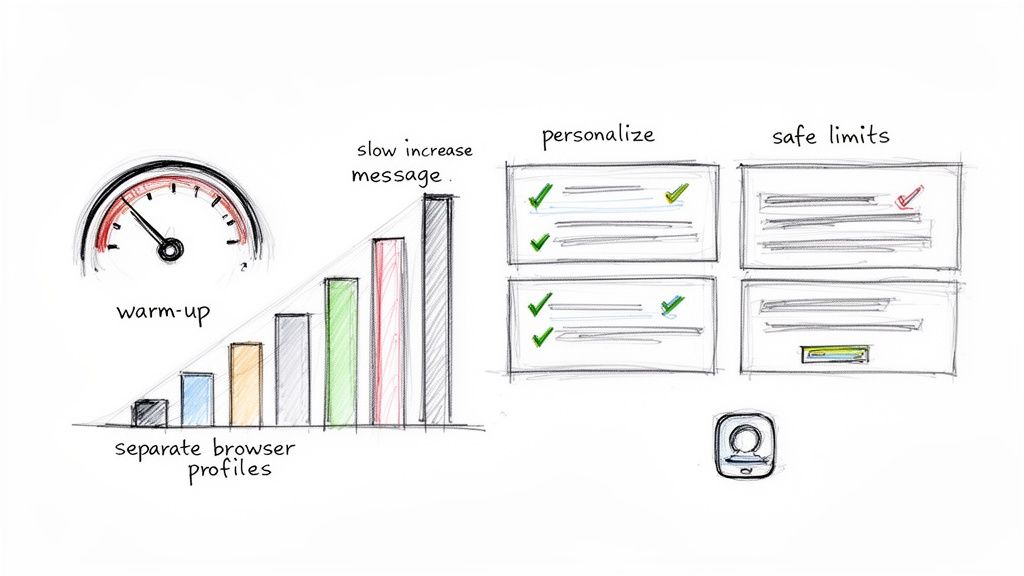
The single most important part of this is the account warm-up. Think of a brand-new (or long-dormant) LinkedIn profile like a cold engine. You can’t just floor it from a dead stop. You have to let it warm up. The same goes for your account—you need to build trust by gradually increasing your activity.
The Right Way to Warm Up Your Account
A good warm-up perfectly imitates how a new, enthusiastic user would actually behave. You wouldn’t jump on LinkedIn for the first time and immediately fire off 50 connection requests, would you? Of course not. You'd poke around, connect with a few people, and get a feel for the place.
This is exactly the behavior you want to model. It's how you train the algorithm to see your profile as legitimate, which is the best answer to the question "why is my LinkedIn account restricted?" when it’s usually because of a sudden spike in activity.
Here’s a simple schedule to follow:
- Week 1: Keep it light. Visit 5-10 profiles a day, send 5-10 personalized connection requests, and like or comment on a handful of posts in your feed.
- Week 2: Start ramping up, but gently. You can bump your numbers up to 10-15 profile visits and connection requests daily.
- Weeks 3-4: Continue the slow and steady climb toward 20-25 daily requests. All the while, make sure you're still engaging with content.
This patient, methodical warm-up creates a history of normal behavior for your account. It builds a strong foundation that makes it much more resilient when you eventually start your bigger outreach campaigns. For a deeper dive, check out our guide on a safe LinkedIn automation workflow that really breaks down the risk factors.
Advanced Tips for Scaling Your Outreach Safely
Once you’ve got a properly warmed-up account, the game becomes about maintaining that trust. This is where good habits and a little technical know-how come into play, especially if you're managing a whole team of profiles.
Your goal is simple: make every profile you manage look like it's being used by a unique, real person. A huge red flag for LinkedIn is seeing multiple accounts operating from the same browser or IP address.
To run multiple accounts without setting off alarms, you absolutely need to follow these rules:
- Use Dedicated Proxies: Every single LinkedIn account needs its own high-quality, residential proxy. This ensures each profile has a unique IP address, making it look like they're all being run from different computers in different places.
- Respect the Daily Limits: Even with a seasoned account, don't get greedy. Stick to a maximum of 25-40 connection requests and about 80-100 profile visits per day. This keeps you safely under LinkedIn's radar.
- Personalize Everything: A high connection acceptance rate is your best friend. Generic, copy-paste messages get ignored and can drag your acceptance rate below the dangerous 30% threshold. Messages that prove you've actually read someone's profile work wonders.
On top of this, learning some actionable strategies to get more connections the right way will make your outreach more effective and compliant. By starting slow with a proper warm-up and sticking to these safety measures, you can build a genuinely restriction-proof engine for your lead generation.
A Few Lingering Questions About LinkedIn Restrictions
Getting hit with a LinkedIn restriction is confusing, and even after you've started the recovery process, a few nagging questions usually pop up. Let's clear the air on some of the most common ones we see from teams trying to get back on track.
Can I Still Get Messages If My LinkedIn Account Is Restricted?
Yes, for most temporary restrictions, your inbox still works. You can read and reply to anyone who messages you from your existing network.
The catch is that you can't start any new conversations. Your ability to send new connection requests or message people outside your network is completely frozen. If the violation is serious enough for a permanent ban, well, the whole account is usually locked down until you win an appeal.
Will Using an Automation Tool Always Get My Account Restricted?
Not always, but you’re definitely playing with fire. LinkedIn’s official stance is against most automation, and their detection algorithm is built specifically to sniff out bot-like activity. It’s a gamble every time.
The smarter tools try to fly under the radar by mimicking how a real person would act—slowing things down, randomizing actions, and not going on a clicking spree. To really lower your risk, you have to pair any automation with:
- An aged account that already has a solid reputation.
- Strict daily limits on every activity.
- High-quality proxies to mask your digital footprint.
Is It Safe to Buy a LinkedIn Account for Outreach?
There’s a huge difference here that you need to understand. Buying a cheap, newly created bot profile is the fastest ticket to a permanent ban. Those accounts have zero history, no credibility, and LinkedIn’s system flags them almost instantly.
On the other hand, acquiring a genuinely established, ID-verified account with a real history is a totally different ballgame. These aged profiles come with a high 'trust score' right out of the gate, meaning they can handle more outreach activity without triggering alarms. They're a much more durable asset for scaling your campaigns.
What Happens to My Premium Subscription If My Account Is Restricted?
This is the frustrating part—your LinkedIn Premium subscription keeps charging you, even while your account is temporarily on ice. LinkedIn won't pause or refund your fees for the time you can't fully use the service.
If the worst happens and your account is permanently banned, you have to cancel the subscription yourself. Go into your billing settings and stop the payments manually, because LinkedIn won’t do it for you.
Ready to scale your outreach without constantly looking over your shoulder? BIDVA provides real, ID-verified, and pre-warmed LinkedIn accounts that give your team a trusted foundation from day one. Skip the warm-up grind and start your campaigns with durable, high-performing profiles by visiting our website.
.png)



.svg)