What Email Should I Use for LinkedIn? A Strategic Guide

You launch a LinkedIn campaign on Monday with clean copy, a solid list, and a tool stack you’ve used before. By Wednesday, one profile gets restricted. Another starts asking for extra verification. A third suddenly loses momentum even though the message quality didn’t change.
Teams often blame automation volume first. Sometimes that’s right. But a lot of avoidable damage starts with something more basic. The email attached to the account.
If you’ve been asking what email should i use for LinkedIn, the core question isn’t convenience. It’s trust, recoverability, and whether the email fits the profile well enough to survive scrutiny when your outreach activity increases.
Your LinkedIn Email The Unseen Signal That Defines Your Outreach
For casual users, an email address feels like a setup detail. For agencies, SDR teams, recruiters, and founders running serious outreach, it’s a risk signal.
LinkedIn outreach is worth protecting because the channel performs differently from standard inbox prospecting. LinkedIn InMails average an 18 to 25% response rate, compared with the 3% typical response rate for cold email, making InMail 6 to 8 times stronger on average according to Amra and Elma’s LinkedIn InMail statistics roundup. That same source notes the advantage comes from reaching verified professional profiles inside LinkedIn’s native environment, where trust and context already exist.
That performance gap changes the stakes. If the account gets flagged, you’re not just losing a login. You’re losing access to a high-response channel.
Why email matters more than most teams expect
LinkedIn doesn’t evaluate outreach accounts in a vacuum. It looks for consistency across signals. The email tied to the profile is one of those signals because it helps establish whether the account looks stable, believable, and aligned with its stated identity.
A founder using a brand-new Gmail on an older executive profile looks different from a founder using a long-standing business domain tied to the same brand. An SDR running outreach from a profile with a mismatched recovery email introduces another inconsistency. Recruiters handling profile handoffs often create problems by treating email as a replaceable accessory rather than part of the account’s history.
Practical rule: If your LinkedIn profile is part of revenue generation, the email attached to it should be treated like infrastructure, not a convenience setting.
What breaks campaigns in the real world
The failure pattern is usually boring. A team buys tools, tunes sequences, rotates activity carefully, then attaches the wrong email type because it’s fast. That shortcut creates friction later during verification checks, handoffs, or restrictions.
What works is simpler:
- Use an email that matches the account’s role
- Keep ownership and recovery under your control
- Avoid anything that looks temporary, recycled, or inconsistent
- Treat email choice as part of account trust from day one
That’s the frame for every decision that follows.
Comparing the Five Main Email Options for LinkedIn
Not all LinkedIn emails create the same risk. Some are fine for ordinary networking. Others are a bad fit the moment you move into outbound, account sharing, automation, or profile transfers.
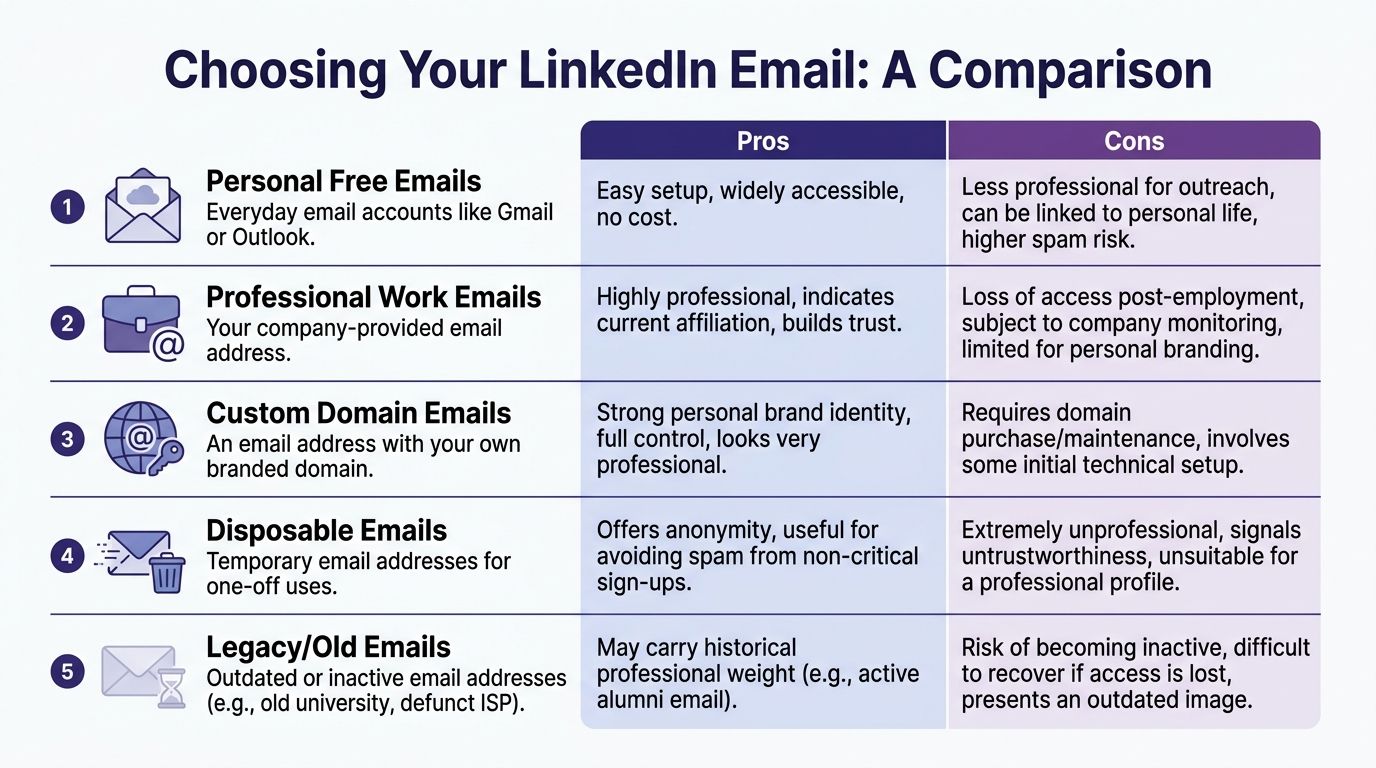
Quick comparison
| Email type | Best use | Pros | Cons |
|---|---|---|---|
| Personal free email | Basic personal profile use | Fast setup, no cost, easy access | Weak trust for outreach, personal exposure, mismatch risk |
| Professional work email | Active employee using main profile | Strong credibility, clear company alignment | Access risk after departure, company oversight |
| Custom domain email | Agencies, founders, outreach teams | Control, brand consistency, better long-term fit | Requires setup and maintenance |
| Role-based email | Shared operational use only | Team visibility, auditability | Feels impersonal on individual profiles |
| Disposable or temporary email | Never for live LinkedIn profiles | Short-term anonymity | Extremely poor recovery and trust profile |
Personal free emails
Gmail and Outlook are common because they’re easy. That doesn’t make them good for scale.
For ordinary users, they’re acceptable. For outreach accounts, they often become the weak point. Mismatched or free emails can cause 35 to 50% higher restriction rates because LinkedIn cross-references the domain against profile age, location, and activity velocity, according to Inboxlogy’s discussion of LinkedIn data and email alignment.
Use a free email only when the profile is personal, low-risk, and not part of a larger outbound system.
Professional work emails
A company email is often the cleanest option for a main operating profile. It signals affiliation and usually looks right to prospects who check your profile before replying.
The problem is ownership. If the employee leaves, the company may cut access. If the company owns the mailbox, monitoring and internal policy can also complicate outreach workflows.
This option is strongest when the person behind the profile is still active in that business and the account is meant to represent current employment.
Custom domain emails
For outreach, this is usually the strongest middle ground.
A custom domain gives you control without looking disposable. It lets agencies separate client assets from personal inboxes. It also helps founders avoid tying experiments to their main personal mailbox.
If you’re comparing providers, it’s worth reviewing secure alternatives to traditional email services so you’re not choosing based on familiarity alone.
Role-based emails
Addresses like sales@, growth@, or recruiting@ have a place, but usually not as the visible identity anchor for a person-based LinkedIn profile.
They’re useful for internal recovery flows, shared oversight, and process management. They’re weaker when the account is supposed to belong to a real individual with a specific professional identity.
A named mailbox usually looks more natural than a generic team address.
Disposable and temporary emails
These shouldn’t be attached to a serious LinkedIn account. They fail the professionalism test and create recovery problems later.
If you’re doing one-off signups, that’s a different conversation. For a profile that’s going to send invites, messages, or InMails, temporary email is a bad bet.
Temporary email solves the smallest problem first and creates the biggest problem later. You avoid spam now, then lose the account when recovery matters.
The Right Email Strategy for Your Professional Role
Generic LinkedIn email advice is built for job seekers. That’s why so much of it falls apart for teams doing outbound at scale.
For outreach accounts, the issue isn’t just what looks professional. It’s what survives verification, handoffs, client oversight, and day-to-day campaign pressure. A 2025 LinkedIn transparency report noted that 40% of restrictions on accounts used for automated outreach stem from email-profile mismatches, as summarized by LinkedIn Training.
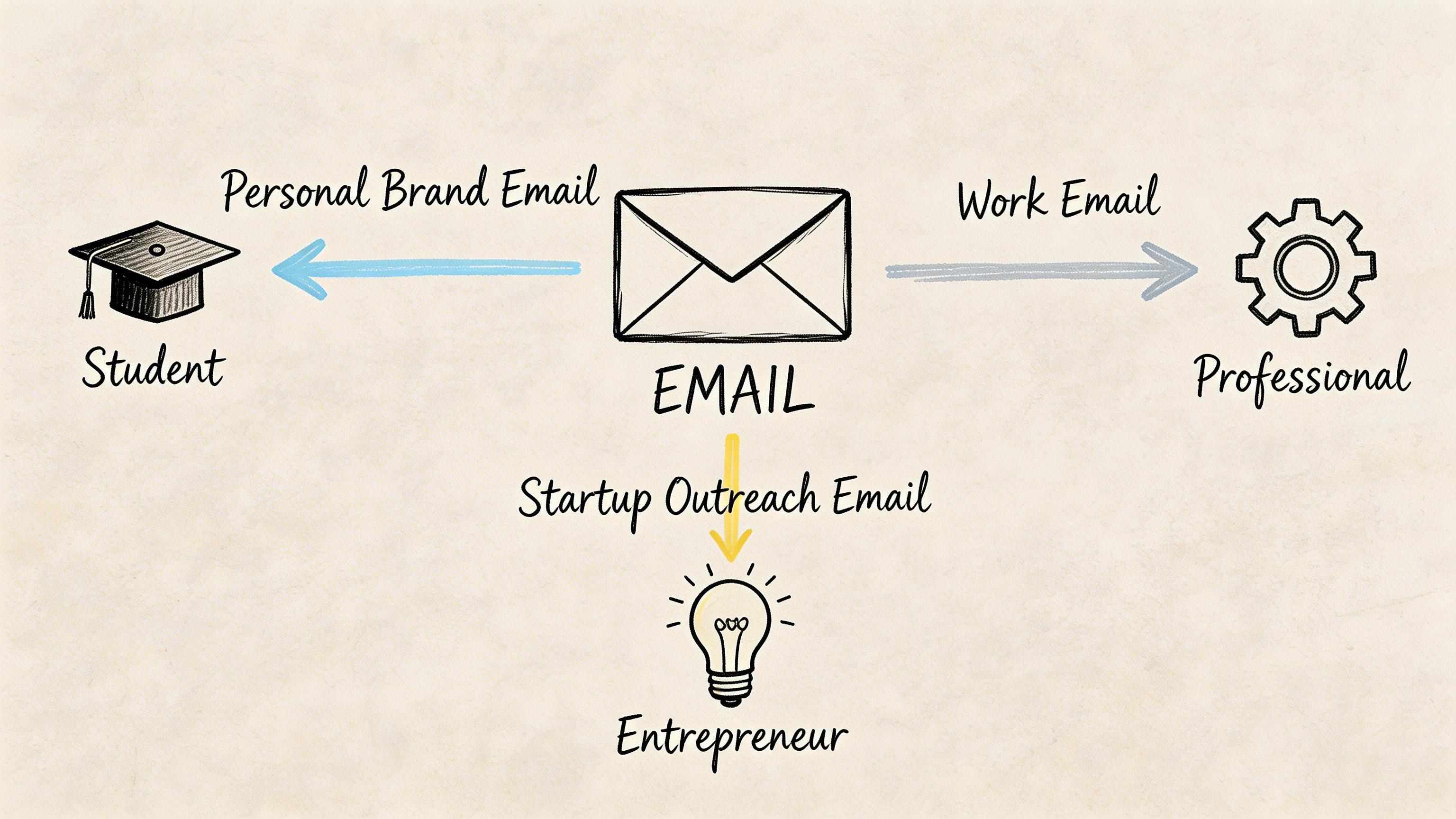
SDRs and sales teams
If you’re running outbound from multiple seats, don’t use one person’s personal Gmail as the glue holding the system together. That’s how teams lose visibility and recovery control.
A stronger setup looks like this:
- Named business mailbox per profile so each seat has its own identity
- Company ownership so access doesn’t disappear when a rep changes roles
- Profile-email alignment so the account doesn’t look patched together
- Separate recovery control handled by the team, not one individual employee
For sales teams, the right email is usually a named business address on a domain your company controls.
Agencies managing client outreach
Agencies need two things at once. Profiles must look credible to prospects, and the asset must remain manageable during handoffs.
That means avoiding personal inboxes owned by freelancers or former employees. It also means avoiding shared chaos where multiple profiles point back to one mailbox.
Use client-aligned or agency-controlled custom domain mailboxes based on who owns the profile and who needs long-term audit access. If you’re handling transferred or operational accounts, this guide on optimized LinkedIn outreach with verified email access is useful because it focuses on control and continuity rather than job-seeker advice.
Recruiters
Recruiters often get caught in the middle. They need profiles that feel personal, but they also need recoverability during team changes and sourcing spikes.
A named business email usually works best for recruiter-led outreach. It preserves professionalism while keeping the account connected to the firm rather than the recruiter’s private mailbox.
Use a secondary recovery layer that your team controls. Don’t let the only path back into a sourcing account live inside one person’s personal inbox.
A useful walkthrough on the broader strategy side is below.
Founders and solopreneurs
Founders should be more careful than anyone else. Your main LinkedIn profile is part of your brand. If you attach every test, automation experiment, and outreach sprint directly to it, you’re concentrating risk in the worst place.
Use your primary business email on your main founder profile if that profile represents your real public identity. For test accounts or secondary outreach operations, use separate custom domain addresses that still look legitimate and recoverable.
Your main founder profile should build authority. It shouldn’t absorb every outbound experiment your team wants to try.
Protecting Your LinkedIn Account from AI Data Scraping
A lot of people still assume email provider choice is mostly about usability. That’s outdated.
LinkedIn began using global user data for generative AI training in late 2024, processing profile data, posts, and connections unless users opt out, according to Tuta’s analysis of LinkedIn AI data use. For outreach operators, that matters because it changes the privacy side of account management.
Why this matters for outreach teams
Your email doesn’t exist in isolation. It connects to profile data, activity patterns, and account history. If your setup leaks more metadata or creates extra visibility into how accounts behave, that can work against you when you’re trying to keep outreach operations clean.
The concern isn’t that every account will suddenly get flagged because of one provider. The concern is that some providers expose more than others and give you less control over what’s being processed, retained, or correlated.
What a safer provider does
Privacy-focused mail providers with zero-knowledge architecture reduce unnecessary exposure. In practical terms, they give your team tighter control over mailbox access and reduce reliance on providers whose business model is built around broad data processing.
For high-value LinkedIn accounts, that’s a security decision, not just a privacy preference.
Look for these traits:
- Provider-level privacy posture that doesn’t treat mailbox data as training fuel
- Clear ownership controls so your team controls access and recovery
- Business-ready use rather than consumer-first convenience
- Consistency across accounts so your profile setup doesn’t look improvised
If you’re scaling outbound, this deeper guide to LinkedIn account security for 2026 outreach scaling is worth reviewing because it ties account safety back to operational choices, not just content quality.
The practical trade-off
Gmail is easy. Outlook is familiar. That’s why teams keep defaulting to them.
But easy and familiar aren’t the same as low-risk. If you’re running one personal profile and doing light networking, that may be fine. If you’re operating multiple outreach accounts, provider choice becomes part of your safety model.
A privacy-focused mailbox won’t fix reckless outreach. It can remove one avoidable source of exposure.
Practical Guide to Email Setup Verification and Warm-Up
The right email type helps. The setup discipline matters just as much.
A lot of account problems start after the email decision, not before it. Teams attach a decent mailbox, then skip verification hygiene, reuse addresses across profiles, or change ownership too quickly.
Start with ownership and recovery
If you don’t fully control the mailbox, you don’t fully control the LinkedIn account.
That means you need:
- Direct mailbox access for the operator or account owner
- Recovery access that stays with the business
- Stored credentials and backup procedures that survive staff changes
- Stable mailbox history instead of frequent swaps
As many as 25% of multi-account users report email verification failures during lockouts, recent LinkedIn API changes increased automation-related validation failures by 35%, and accounts with stable email histories show a 60% higher rate of ban reversals, according to Things Career Related.com/2021/08/24/dont-hide-from-hiring-authorities-4-areas-to-list-your-email-address-on-your-LinkedIn-profile/).
Warm the email before you lean on the account
A new mailbox attached to a profile shouldn’t immediately jump into heavy operational use. Give it a believable activity pattern first.
That doesn’t need to be complicated. The point is consistency. Send normal messages. Receive replies. Let the mailbox exist like a real working address before it becomes a recovery point or operational anchor for outreach.
If you want a practical refresher on sequencing that process, this overview of the email warm-up process is a useful companion.
Basic implementation checklist
- Use one mailbox per LinkedIn profile. Don’t recycle one inbox across several accounts.
- Verify the address immediately after attaching it.
- Keep the domain and profile identity coherent so the setup makes sense to both systems and humans.
- Avoid rushed email changes right before launching outreach.
- Document who owns what if an agency, SDR manager, or ops lead may need to recover the account later.
For teams that need the operational version of this, including handoff and access control considerations, this guide to mastering email access best practices for LinkedIn covers the mechanics well.
What not to do
The common mistakes are predictable:
- Using one recovery inbox for multiple accounts
- Switching to a free email because it’s convenient
- Attaching an inbox nobody will maintain
- Treating verification emails as a one-time nuisance instead of an account health process
That last point matters more than it sounds. Recovery isn’t an edge case. In high-volume outreach, it’s part of routine operations.
Frequently Asked Questions about LinkedIn Email Strategy
Can I use one email for multiple LinkedIn accounts
You shouldn’t.
Even when teams try to do this for convenience, it creates ownership confusion, recovery risk, and ugly handoff problems. A one-to-one relationship between profile and mailbox is cleaner, safer, and easier to manage when restrictions or verification checks happen.
What’s the best email for a LinkedIn outreach account
In most professional outbound setups, a named business email on a custom or company-controlled domain is the strongest choice.
It looks legitimate, supports team control, and avoids the sloppy appearance of a free mailbox bolted onto a profile that’s supposed to represent a business function.
Is Gmail bad for LinkedIn
Not universally. It depends on the use case.
For a regular personal profile, Gmail can be fine. For multi-account outreach, agency operations, or high-scrutiny workflows, it’s often weaker than a business-domain setup because it introduces mismatch and credibility issues.
Should I use my company email or my personal email
If the LinkedIn profile is part of your current professional role, company email is usually better than personal email.
If you need long-term control beyond one employer, a custom domain you control can be even better. The key is matching the email strategy to the profile’s purpose and ownership model.
What’s the difference between a primary and secondary email on LinkedIn
The primary email is your main login and identity anchor. A secondary email helps with backup and recovery.
For outreach professionals, the distinction matters because recovery planning should never be improvised after a restriction happens. Decide that structure before the account becomes operationally important.
Should I change the email on a warmed-up or aged account right away
Usually, no. Change management should be careful.
If an account already has history, abrupt changes can create avoidable friction. Review the account condition, understand who currently controls recovery, then migrate deliberately. Fast swaps made right before activity ramps up often create unnecessary risk.
Are role-based emails like sales@ or recruiting@ a good idea
They’re fine for internal oversight. They’re usually not ideal as the core identity for an individual LinkedIn profile.
Named mailboxes tend to align better with person-based profiles, especially when prospects check who’s contacting them.
What email should recruiters use for LinkedIn
A named business email is typically the right answer.
It keeps the recruiter visible as a real person while preserving firm-level control, team continuity, and account recoverability when roles change.
If your team is scaling LinkedIn outreach and needs accounts with clean ownership, real verification, and email access you can control, take a look at BIDVA.com). It’s built for agencies, SDR teams, recruiters, and operators who need warmed-up, ID-verified LinkedIn assets that hold up under real campaign conditions.