The LinkedIn Connection Request Limit Guide for 2026

Ever felt like you’ve hit an invisible wall on LinkedIn while trying to expand your network? One minute you're sending connection requests, and the next, you're locked out. That’s the LinkedIn connection request limit making its presence known.
LinkedIn intentionally puts a cap on weekly invites—typically around 100 requests for most users—to keep the platform from turning into a spam-fest and to push for more meaningful networking.
Understanding the LinkedIn Connection Request Limit
Think of the limit as a kind of social speed bump. It’s LinkedIn’s way of forcing everyone to slow down, protect users from a flood of low-quality solicitations, and maintain a professional atmosphere. If you rely on LinkedIn for sales, recruiting, or just building a powerful network, learning to work with this limit is essential.
Trying to bulldoze your way through it will only lead to headaches. At first, you’ll just get a simple pop-up telling you to try again next week. But if you keep hitting that ceiling, you risk getting your account flagged, temporarily restricted, or in the worst-case scenario, shut down for good. That can bring your outreach to a dead stop, costing you valuable leads and momentum.
The Standard Weekly Cap
So, what's the magic number? For years, LinkedIn has stuck to a weekly limit of roughly 100 connection requests for most standard accounts. This policy is a core part of how they manage platform quality.
If you do the math, that gives you about 15-20 invites per weekday. It's crucial to pace yourself; sending them all in one go is a quick way to get your account flagged.
It's also not as simple as the counter resetting at midnight on Sunday. The limit is a rolling seven-day window. If you send a request on a Tuesday at 10 AM, that specific slot doesn't free up until the following Tuesday at 10 AM. Getting a handle on this rolling system is the key to managing your outreach without getting locked out.
To give you a clearer picture, here’s how the limits generally break down across different account types as of 2026.
Typical LinkedIn Connection Request Limits at a Glance (2026)
| Account Type / Status | Typical Weekly Request Limit | Key Considerations |
|---|---|---|
| New or Low-Activity Accounts | 50-80 | Highly sensitive to acceptance rates. Easily restricted. |
| Standard Free Accounts | ~100 | The most common limit. Pacing is critical. |
| Sales Navigator Accounts | 100-200 | Often higher, but still subject to activity monitoring. |
| Warmed & ID-Verified Accounts | 200+ | The highest trust signal; allows for more scale, but still not unlimited. |
These numbers aren't set in stone and can change based on your account's health, but they provide a solid benchmark for planning your outreach strategy.
Key Takeaway: Your connection limit isn't just a number—it’s a direct measure of your account’s trustworthiness. A low acceptance rate or a backlog of ignored requests tells LinkedIn that people don't want to connect with you, and the platform will tighten your leash accordingly.
Why Quality Trumps Quantity
Ultimately, the limit forces a much-needed strategic shift. Instead of blasting out hundreds of generic invites, the goal becomes sending highly targeted, personalized requests. One thoughtful message to the right person is infinitely more valuable than 20 random ones that get ignored.
Focusing on quality does more than just get you past the gatekeeper; it boosts your acceptance rate, which signals to LinkedIn's algorithm that you're a valuable member of the community. To truly master this, it's vital to understand the ins and outs of the LinkedIn invitation limit. And if you want to see exactly how your own activities are being monitored, it helps to know how to read your /post/linkedin-account-activity-history-explained.
How Different LinkedIn Limits Impact Your Outreach
When it comes to LinkedIn's connection limits, it's not just one single rule you have to worry about. Think of it less as a single speed limit and more like a set of checks and balances designed to keep the platform healthy. If you’re serious about outreach, you need to understand how each of these limits works, because they all affect your strategy in different ways.
Let's break them down. You’ve got your daily sending speed, your weekly cap, and your lifetime connection total. Each one is a different piece of the puzzle.
The Daily Sending Velocity
First up is what I call daily sending velocity. This isn't an official term you'll find in LinkedIn's help docs, but it's the first tripwire most people hit. It’s all about pacing. If you try to send out a huge batch of requests in a short time—say, 50 invites in an hour—you're going to raise a red flag. LinkedIn's systems will see that sudden burst of activity as bot-like, even if you’re technically under your weekly limit.
This is what trips up people who try to cram all their weekly networking into one Monday morning session. The key is to fly under the radar. A slow and steady approach, sending maybe 15-20 requests spread throughout the day, looks far more natural and is much safer for your account's health.
The Weekly Connection Request Limit
This is the big one everyone talks about: the weekly connection request limit. For most standard accounts, this number hovers around 100 invites. Once you hit that cap within a rolling seven-day period, LinkedIn simply puts a stop to your outreach. You can't send any more invites until your earliest ones from the previous week "expire" from the count.
For anyone in sales, recruiting, or business development, this is the most immediate roadblock. Hitting this wall means your pipeline-building grinds to a halt. One day you’re on a roll, the next you’re stuck waiting for the counter to reset. It can completely derail your workflow for days at a time.
This diagram gives you a good visual of how all these factors play into your account's overall standing.
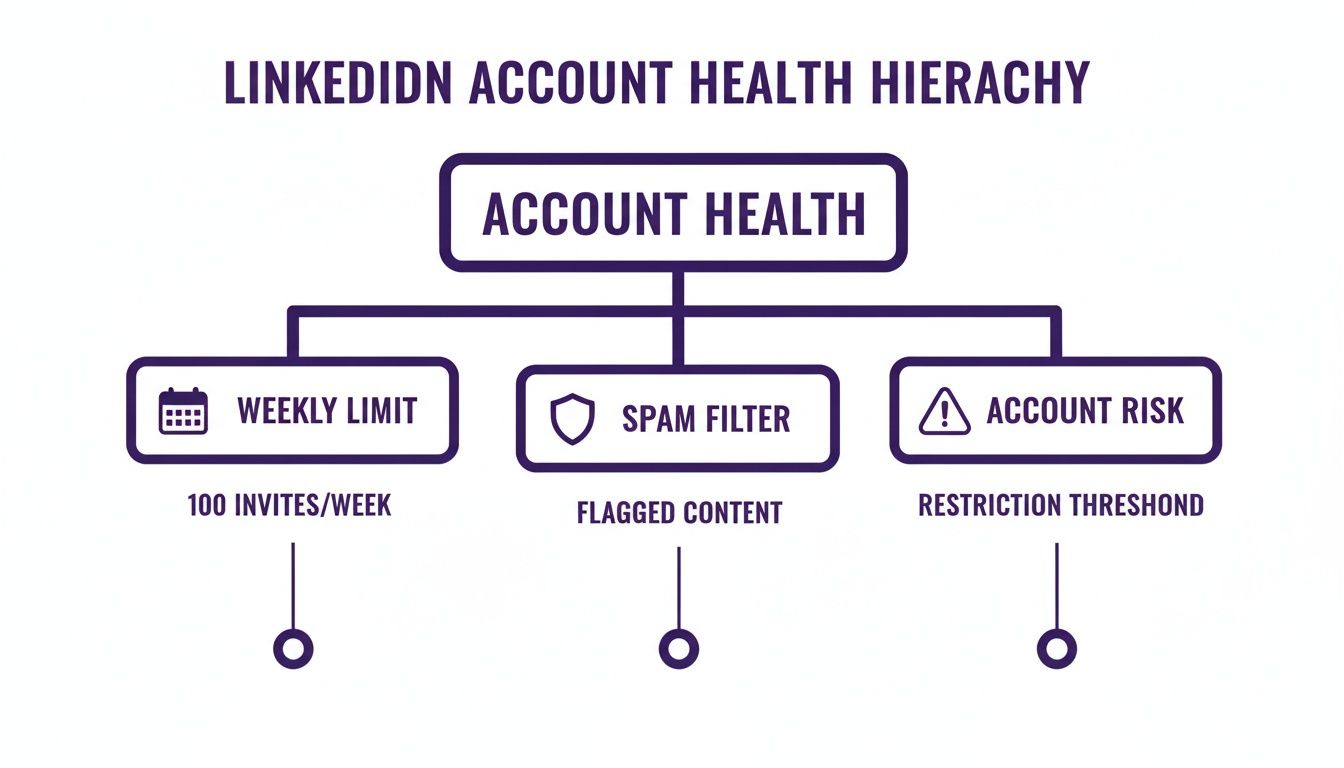
As you can see, it’s a balancing act between your weekly sending habits, staying out of the spam filters, and managing your overall account risk.
The Ultimate 30,000 Connection Ceiling
Finally, we have the lifetime cap: the 30,000 connection ceiling. This is the absolute maximum number of direct connections you can have. Once you hit 30,000, your profile's "Connect" button permanently changes to a "Follow" button. You're cut off—no more sending or accepting new connection requests until you start removing people from your network.
This limit applies to everyone, whether you have a free account or pay for Premium or Sales Navigator. While it might sound like a massive number, it's a very real problem for the platform's most dedicated users. In fact, while only about 0.5% of LinkedIn’s members ever reach it, these are the super-connectors, influencers, and top-tier recruiters. For them, pruning thousands of old contacts just to make room for new ones becomes a huge, time-consuming chore. You can find more data on LinkedIn's connection policies and how they've changed over time.
Key Takeaway: These three limits—daily, weekly, and total—are all connected. Sending too many invites too quickly (daily velocity) can damage your account's reputation and might even lead LinkedIn to lower your weekly allowance. In the long run, the 30,000 cap forces even the best networkers to shift their focus from quantity to quality.
The Hidden Factors That Control Your Personal Limit
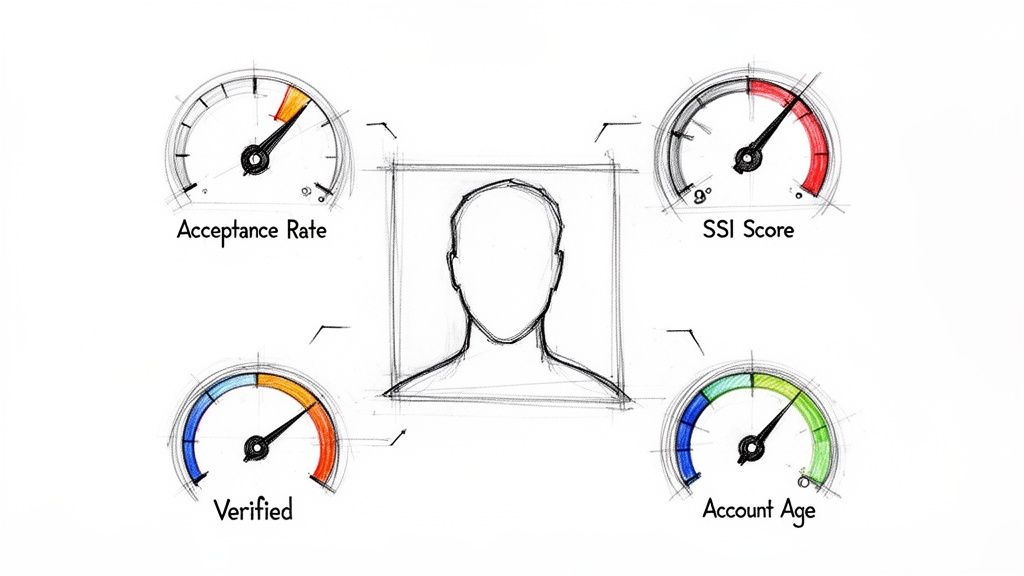
Ever wondered why one sales rep can send over 200 invites a week while their colleague is stuck at 80? It’s because the LinkedIn connection request limit isn't a fixed number. It’s a dynamic allowance that LinkedIn’s algorithm calculates just for you, almost like a personalized credit score for your networking activity.
Think of it as your account's "trust score." The more LinkedIn trusts you to be a valuable, non-spammy networker, the more freedom it gives you in the form of a higher sending limit. This score isn't a mystery, though—it's based on several key signals you can directly influence.
The Most Important Metric Is Acceptance Rate
If you only have time to focus on one thing, make it this: your connection acceptance rate. This is the single most powerful signal you can send to LinkedIn. It's the percentage of people who actually click "Accept" on your requests.
A high acceptance rate—ideally above 40-50%—tells the algorithm that your outreach is relevant, well-received, and valuable to other members. On the flip side, a low rate makes you look like you're spamming, prompting LinkedIn to pull back on the reins to protect its user experience.
Key Insight: Your weekly limit isn't just about how many requests you send; it's about how many are accepted. A high acceptance rate is your ticket to a higher sending capacity.
Other Major Trust Signals
While your acceptance rate is king, it doesn't stand alone. LinkedIn looks at a whole cocktail of factors to gauge your account's health and credibility.
- Social Selling Index (SSI) Score: This is LinkedIn's own report card on your professional branding and networking skills. Users with a high SSI, typically above 70, are seen as top-tier members and are often rewarded with a more generous connection allowance.
- Account Age and History: A brand-new account is on a very short leash. LinkedIn doesn't know you yet. But a mature profile with months or years of positive, consistent activity has built up a history of trust, earning it a higher limit.
- Profile Verification: A simple checkmark can make a world of difference. Verifying your profile with a government ID or work email proves you're a real human, not a bot. This layer of authenticity can give your sending privileges a nice boost.
- Pending Invitations: This is a big one. A huge backlog of unanswered connection requests is a major red flag. It's essential to regularly withdraw any pending invites that are more than 2-3 weeks old to keep your account in good standing.
How These Factors Work Together
Let’s see how this plays out in the real world.
Imagine a brand-new, unverified profile sending out generic, untargeted requests. Its acceptance rate plummets, and old, unanswered invites are piling up. LinkedIn's algorithm flags this as risky behavior and slams the brakes, keeping the weekly limit low, probably around 50-80 requests.
Now, consider a second profile. It's a year old, ID-verified, and boasts an SSI score of 75. The owner sends personalized, relevant requests and maintains a 60% acceptance rate. LinkedIn sees this account as a model citizen and rewards it with a much higher weekly limit, potentially 200 invites or even more.
Understanding these hidden levers is the first step to scaling your outreach. By actively managing your acceptance rate, boosting your SSI score, and maintaining a clean, credible profile, you can directly influence your personal LinkedIn connection request limit and earn the trust needed to grow your network effectively.
Proven Strategies to Maximize Your Outreach Safely
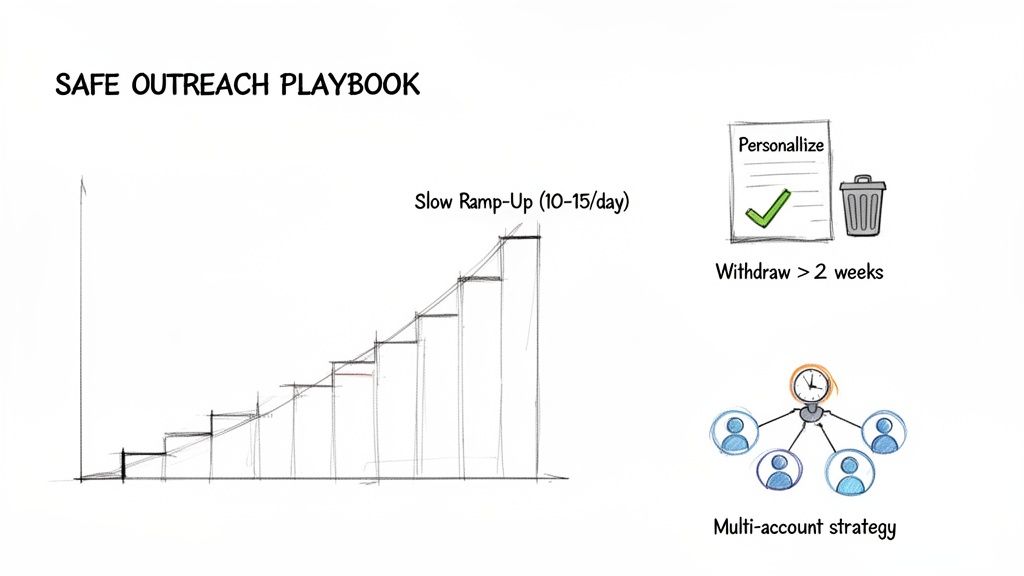
Knowing the LinkedIn connection request limit is one thing, but actually playing the game to win is something else entirely. If you want to scale your outreach without constantly getting put in LinkedIn jail, you need a playbook that keeps you off the algorithm's radar. These are the field-tested tactics that help you work with LinkedIn, turning your profile into a powerful asset.
It all boils down to one thing: your activity needs to look natural, valuable, and human. Abrupt spikes in activity and a low acceptance rate are the fastest way to get your account flagged. A more thoughtful, strategic approach is the key to building momentum and hitting your networking goals without tripping any alarms.
Adopt the Slow Ramp-Up Method
If your LinkedIn profile is new or you're just dusting it off after a long break, going from zero to sending 100 requests a week is a terrible idea. That sudden blast of activity screams "bot!" to LinkedIn's monitoring systems. You have to warm up the account first.
Think of it like getting back to the gym after a year off—you don’t walk in and immediately try to bench press your personal best.
- Start slow and steady. For the first week, send just 10-15 connection requests a day. This builds a consistent, believable baseline of activity.
- Be present on the platform. Don't just send requests and log off. Spend time scrolling your feed, liking posts, and dropping a few thoughtful comments.
- Increase your volume gradually. After a solid week, you can start adding another 5-10 requests to your daily sends each week.
This slow-and-steady approach shows LinkedIn you're a real person building a network with intent, not a spammer. It’s a core principle for building your account's "trust score" over time. For a deeper look at this process, check out our guide on building a safe LinkedIn automation workflow that keeps your account safe.
Personalize Everything and Prune Your Pending Box
Generic, copy-and-paste connection requests are the absolute enemy of a high acceptance rate. If your message looks like it could have been sent to a thousand other people, it’s going straight to the bin, and your account's health score suffers for it.
Personalization is your secret weapon. Mention a recent article they shared, a mutual connection you both respect, or something specific from their profile that caught your eye. A single, genuine sentence can take your acceptance rate from a dismal 10% to well over 50%.
Just as crucial is keeping your pending requests folder clean. A massive backlog of ignored invites is a dead giveaway to LinkedIn that your outreach isn't landing well.
Pro Tip: Once a week, go into your "Sent" invitations and withdraw any request that’s over two weeks old. This simple piece of housekeeping keeps your profile in good standing and stops your trust score from tanking.
Scaling with a Multi-Account Strategy
For serious sales teams, recruiters, and marketing agencies, one profile just isn't going to cut it. Bumping up against the weekly LinkedIn connection request limit on a single account can halt an entire campaign in its tracks. This is where a professional multi-account strategy becomes a necessity.
The idea is to spread your outreach across several high-quality, properly warmed-up LinkedIn profiles. Instead of one account pushing the limit with 100 requests, you could have five accounts each safely sending a paced 80 requests per week. You've just multiplied your outreach capacity five-fold.
Doing this right requires careful management to fly under the radar. Each account needs its own unique digital fingerprint, which means using separate proxies and browser profiles. Most importantly, every profile must be a credible, real asset—not some throwaway fake that will get shut down in a week. By diversifying your outreach, you make your lead generation engine more resilient, ensuring that one account restriction doesn't sink the whole ship.
Scaling Your Outreach with Warmed and Verified Accounts
For any serious sales team or lead gen agency, bumping up against the LinkedIn connection request limit isn't just a minor headache—it's a major roadblock to growth. You need to scale your outreach, but trying to do that on a single new account is a slow, frustrating, and often risky game. This is where you need a smarter approach for predictable results.
The best strategy for scaling safely and quickly involves using professionally prepared LinkedIn accounts. These aren't just empty shells; they are high-trust profiles built from the ground up to handle serious outreach without setting off LinkedIn's alarms.
The Power of Pre-Warmed and Verified Profiles
Think of a brand-new LinkedIn account like an unseasoned cast-iron skillet. You can't just throw it on high heat and expect a perfect meal; you'll get a sticky, smoky mess. First, you have to carefully season it over time, slowly building up a non-stick surface. A new account is the same—it has no trust with LinkedIn, no history, and a very low tolerance for activity. You have to spend weeks, sometimes months, "warming it up" before you can count on it.
A pre-warmed, ID-verified account, on the other hand, is like starting with a perfectly seasoned skillet. These accounts have been meticulously aged and come with a history of natural activity, so they look like credible, long-standing members of the community right from the start.
Most importantly, they come ready to go with:
- ID Verification: The account has already been verified with a government-issued ID, which is a massive trust signal for LinkedIn's algorithm.
- Hundreds of Real Connections: They start with 200-500+ real, first-degree connections, showing a healthy, established network.
- A High Trust Score: This combination of age, verification, and an existing network gives the profile a high trust score from the moment you log in.
This completely bypasses the entire risky and time-consuming warm-up phase. You can plug these accounts into your outreach campaigns on day one and operate with far more confidence and capacity.
Unlocking Higher Sending Limits Immediately
The most obvious benefit of a warmed, verified profile is a much bigger sending allowance. While a new account is stuck on a tight leash of maybe 50-80 connection requests per week, a high-trust, verified account can often handle 200+ requests weekly right out of the gate. That lets you scale your campaigns instantly.
Let's put the two approaches side-by-side to see just how different the starting line is.
Standard New Profile vs Warmed and Verified Profile
Here’s a direct comparison that shows why starting with a warmed, ID-verified account gives you an immediate, undeniable edge over building from scratch.
| Feature | Standard New Profile | Warmed & Verified Profile |
|---|---|---|
| Initial Weekly Limit | ~50-80 requests | 200+ requests |
| Trust Score | Extremely low | Very high from day one |
| Warm-Up Period | 4-8 weeks of slow activity | Ready for outreach immediately |
| Initial Connections | 0 | 200-500+ |
| ID Verification | Not verified (risk factor) | ID-verified (major trust signal) |
| Risk of Restriction | High | Significantly lower |
As you can see, the difference isn't small. One path is slow and risky, while the other is built for immediate, secure scaling.
Key Takeaway: Investing in a warmed, ID-verified account isn't about finding a shortcut; it's about acquiring a durable, high-performance asset. It transforms your outreach from a gamble into a predictable system.
These accounts provide a secure foundation that works seamlessly with leading automation tools. Because they already look natural and credible, they allow you to run high-volume campaigns that stay under LinkedIn's radar, ensuring your outreach engine is both powerful and resilient. For teams looking to scale efficiently, exploring options to buy bulk LinkedIn accounts that are pre-verified can be a game-changing strategic move.
Putting It All Together: Your Roadmap to Sustainable Growth
Let's get one thing straight: this isn't about finding a sneaky loophole to outsmart LinkedIn. That’s a short-term game with long-term consequences. Real, sustainable growth comes from building a strategy that works with the platform's rules, not against them.
Think of LinkedIn's connection limits less as a roadblock and more as a set of guardrails. They're there to steer you toward higher-quality networking—the kind that actually leads to meaningful conversations and better results. By mastering a few core principles, you can turn your LinkedIn profile into a reliable engine for lead generation, recruiting, or networking, all without risking your account.
Here’s the game plan. It’s straightforward, but it demands discipline.
The Foundations of Safe Outreach
Know the Rules of the Road: First, you have to understand the full picture. That means knowing the difference between the daily sending velocity, the official weekly cap, and that ultimate 30,000 connection ceiling. They all interact, and knowing how is the first step.
Obsess Over Your Trust Score: Your personal limit isn't set in stone; it's dynamic. You need to focus on the signals LinkedIn trusts most, and the king of them all is your connection acceptance rate. A high acceptance rate is your ticket to earning a higher sending allowance. It’s non-negotiable.
Play the Long Game: Slow and steady truly wins this race. Always warm up new accounts gradually, personalize every request you send, and make a habit of regularly withdrawing old, ignored invitations. These simple actions are the bedrock of safe and effective outreach.
Scaling Up Without Blowing Up
Following these steps is usually enough for an individual. But what if you're a sales team or an agency that needs to operate at a much larger scale?
That’s where the final piece comes in: investing in high-quality, pre-warmed assets. Using established, ID-verified accounts gives you a predictable and secure foundation for running high-volume campaigns. It takes the guesswork—and the risk—out of scaling your efforts from day one.
The Big Picture: Success on LinkedIn is a marathon, not a sprint. It’s born from a blend of strategic patience, a relentless focus on quality over quantity, and using the right tools to scale your efforts safely.
Of course, building this kind of momentum isn't just about sending connection requests. You also have to show up and provide value to your growing network. To keep your content strategy on point without getting overwhelmed, a LinkedIn content calendar template can be a lifesaver.
When you combine smart outreach with consistent, valuable content, you're not just avoiding restrictions—you're building a powerful professional brand that attracts opportunities naturally.
Frequently Asked Questions
LinkedIn's connection request limits can be confusing, especially since the rules are always changing. Let's break down some of the most common questions I hear so you can build your outreach strategy on solid ground.
How Many LinkedIn Connection Requests Can I Send Per Day in 2026?
This is the million-dollar question, but LinkedIn doesn't give a straight answer with a hard daily number. Instead, think of it in terms of the weekly limit. Most accounts are capped at around 100 requests per week.
A good rule of thumb is to spread that out, aiming for about 15-20 requests each weekday. Trying to send all 100 on a Monday is a classic rookie mistake that screams "automation!" to LinkedIn's algorithm. Pacing your invites naturally is one of the best ways to keep your account in good standing.
What Happens If I Hit the LinkedIn Connection Request Limit?
When you hit your weekly max, you'll see a pop-up that says, "You’ve reached the weekly invitation limit." It's not a penalty, just a temporary pause. You won't be able to send any more requests until the limit resets.
The good news is that it’s a rolling reset. Think of it this way: an invitation you sent on a Tuesday at 9 AM frees up its "slot" the very next Tuesday at 9 AM. You don't have to wait for the whole week to be over. Just give it a day or two, and you'll be able to start sending again as your oldest requests pass the seven-day mark.
Is a Free LinkedIn Account Effective for Outreach?
For just keeping in touch with a few people? Sure. For a real outreach campaign? Absolutely not. In 2025-2026, free accounts are more restricted than ever, with a cap of just 80 connection requests per week and, more importantly, only five personalized notes per month.
LinkedIn tightened these rules to combat a 40% spike in spam complaints. Once you use up those five notes, you're forced to send generic, empty invites. The difference in results is staggering—acceptance rates can drop from a healthy 45% with a personal note to a dismal 10-15% without one. You can explore the full breakdown of free account limitations to see just how restrictive it is.
Key Takeaway: You simply can't scale a serious campaign on a free account. The low limits on both connections and personalized messages will kill your momentum before you even start. You'll need a Premium plan or, for best results, a high-trust warmed account to see any meaningful return.
If you want to skip the entire slow and uncertain warm-up phase, BIDVA offers professionally aged, ID-verified LinkedIn accounts. These accounts are primed for high-volume outreach right away, giving you a higher trust score and a larger sending capacity from day one. Learn more about our verified accounts and start scaling your campaigns the right way.